How KitSlate works

One job,
from hold to paid.

Each document is drawn from the one before it.

THE MODEL . How it all hangs together

A production is the container.

You create the job once.

CALENDARDates & holdsOn the calendar from the moment it is a hold.
CLIENTCompany & contactFrom the clients database, not retyped.
THE PRODUCTIONFall Campaign. LookbookNovelle Beauty · Studio A · 2 daysStage. Crew confirmed
CREWRoles & call timesPulled from the crew database.
EQUIPMENTThe gear listPicked out of your own inventory.
QUOTEPriced from the jobGear, crew, studio and fees.
CALL SHEETThe shoot dayTimes, venue, schedule, contacts.
AGREEMENTSAnything signedTalent and location releases.
INVOICEThe billRaised from the approved quote.

Nine things, one job. You do not create nine documents that happen to share a name. You create the production, and each document is drawn from what it already holds.
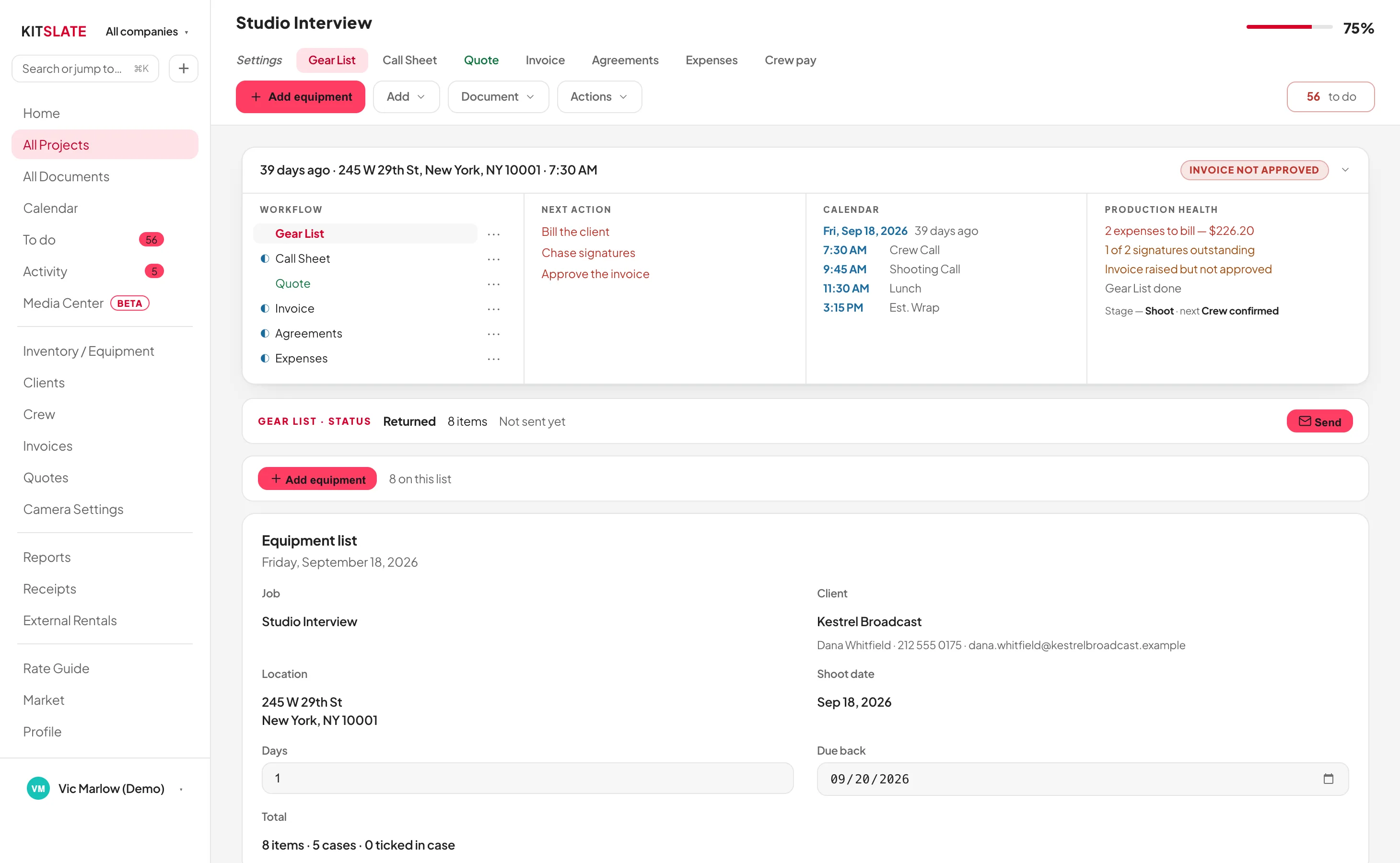
kitslate.app/app · a production
One production open in KitSlate. The five-document workflow down the left with each document's real state, the next actions, the day's call times on the calendar, production health, and a checklist where every line links to the thing it names
One screen: what is done, what is next, what is wrong, and where the job has got to
Draft
Quote sent
Approved
Call sheet sent
Crew confirmed
Gear packed
Shoot
Invoice sent
Paid

The nine stages KitSlate actually tracks. You never set one. Each is reached by something really happening: a document sent, a crew reply, a case packed, a payment recorded.

01 · PLAN . The work arrives

It starts on the calendar, long before it is a job.

Most work is a maybe first.
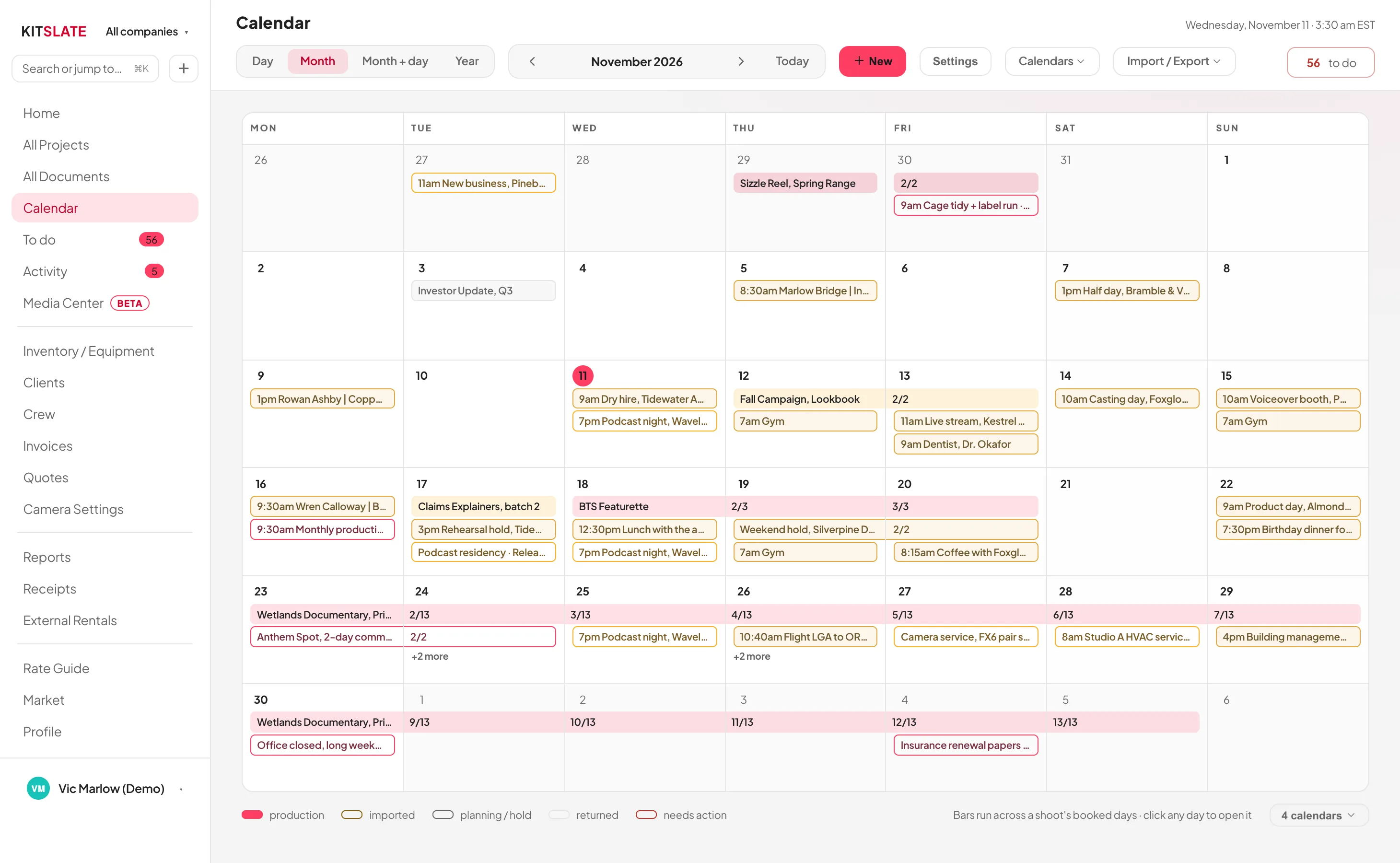
kitslate.app/app · Calendar
The KitSlate calendar in month view. Every company in its own colour, confirmed shoots as solid bars, holds and pencils outlined, calendars imported from elsewhere shown as imported, and a legend naming each
Day, month, month-and-day and year. And calendars you already keep can be brought in beside your own.
1 · THE ENQUIRY

Somebody asks

By email, by phone, or through the contact form on your public page. Which arrives in your KitSlate inbox, ready to answer.

2 · THE HOLD

Pencil it in

A hold or a pencil booking sits on the calendar with the date genuinely marked, so a second enquiry for the same day is not a surprise.

3 · THE PRODUCTION

It becomes the job

Holds and pencils are the two things that turn into a production.

4 · THE PEOPLE

Crew and client

Both come out of databases you already have: the client’s company and contact, and the crew’s role, rate, pronouns, dietary needs and paperwork.

5 · THE CLASH

Before you commit

Book gear, a kit or a crew member already committed to an overlapping job and KitSlate names each clash and the job that has it, before anything is saved.
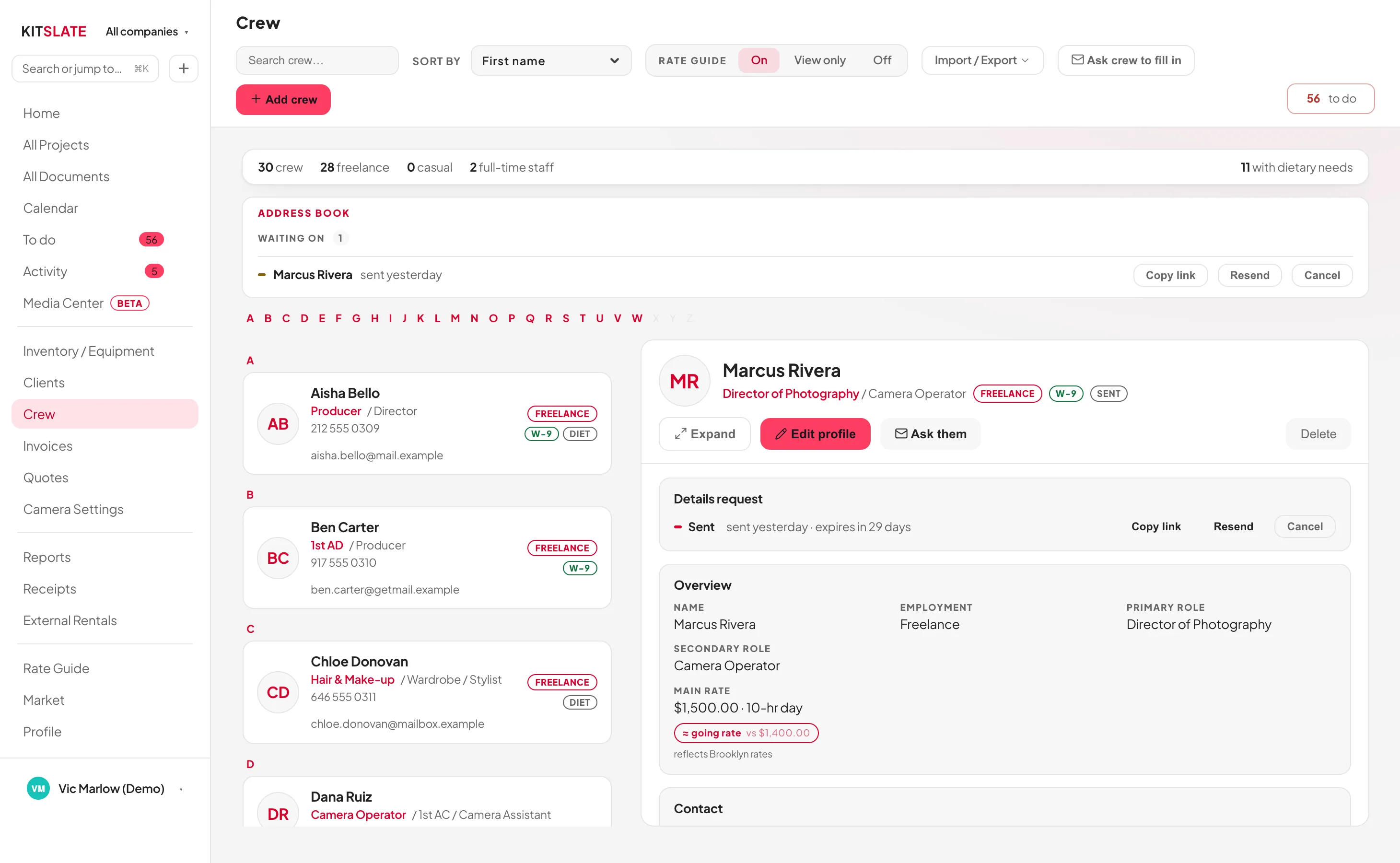
THE CREW DATABASE
kitslate.app/app · Crew
The crew database. Each person with their roles, pronouns, phone and email, whether they are freelance or staff, address-book requests still waiting on a reply, counts across the top including how many have dietary needs, and one person open on the right with their rate and paperwork
Roles, rates, pronouns, licences and dietary needs. Entered once, used by every sheet
02 · PACK . Inventory and gear lists

Inventory is everything you own. A gear list is what this job takes.

That distinction is the one thing worth being clear about.

  1. EVERYTHING YOU OWN

    Built once, and it stays built.

    Gear grouped by category, by location (cases included) or by kit, with serials, day rates and an in, out or faulty status on each item.

    Carries forward: rates, serials and cases
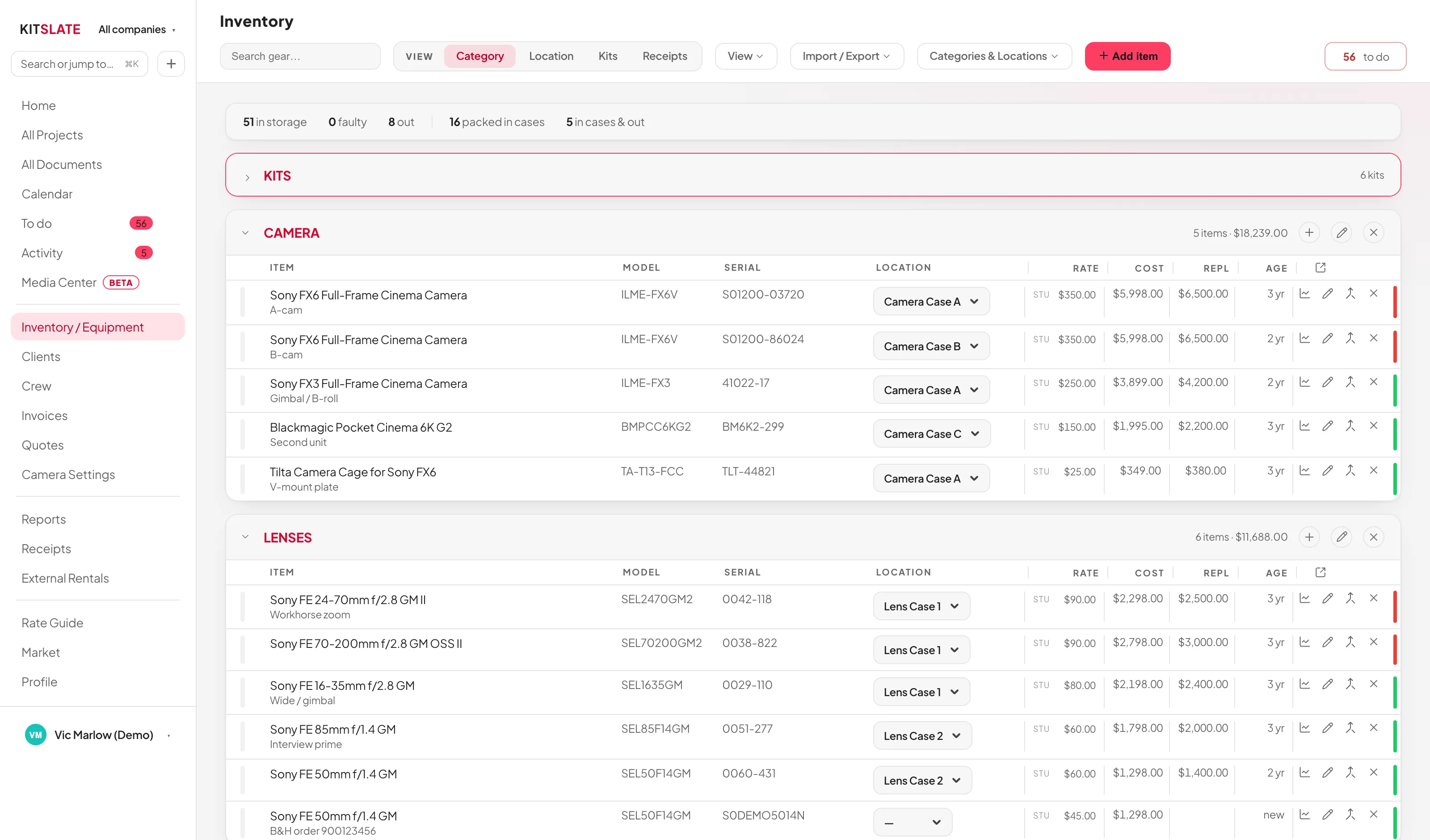
    The inventory, item by item. Camera and Lenses open, each item with its model, serial, case, day rate, cost, replacement value and age, and a status line on the right
    ↔ drag the picture sideways to read it
  2. WHAT THIS JOB NEEDS

    Tick it, and it collects.

    Open the production’s equipment picker and your whole inventory is there.

    Carries forward: the line items the quote is priced from
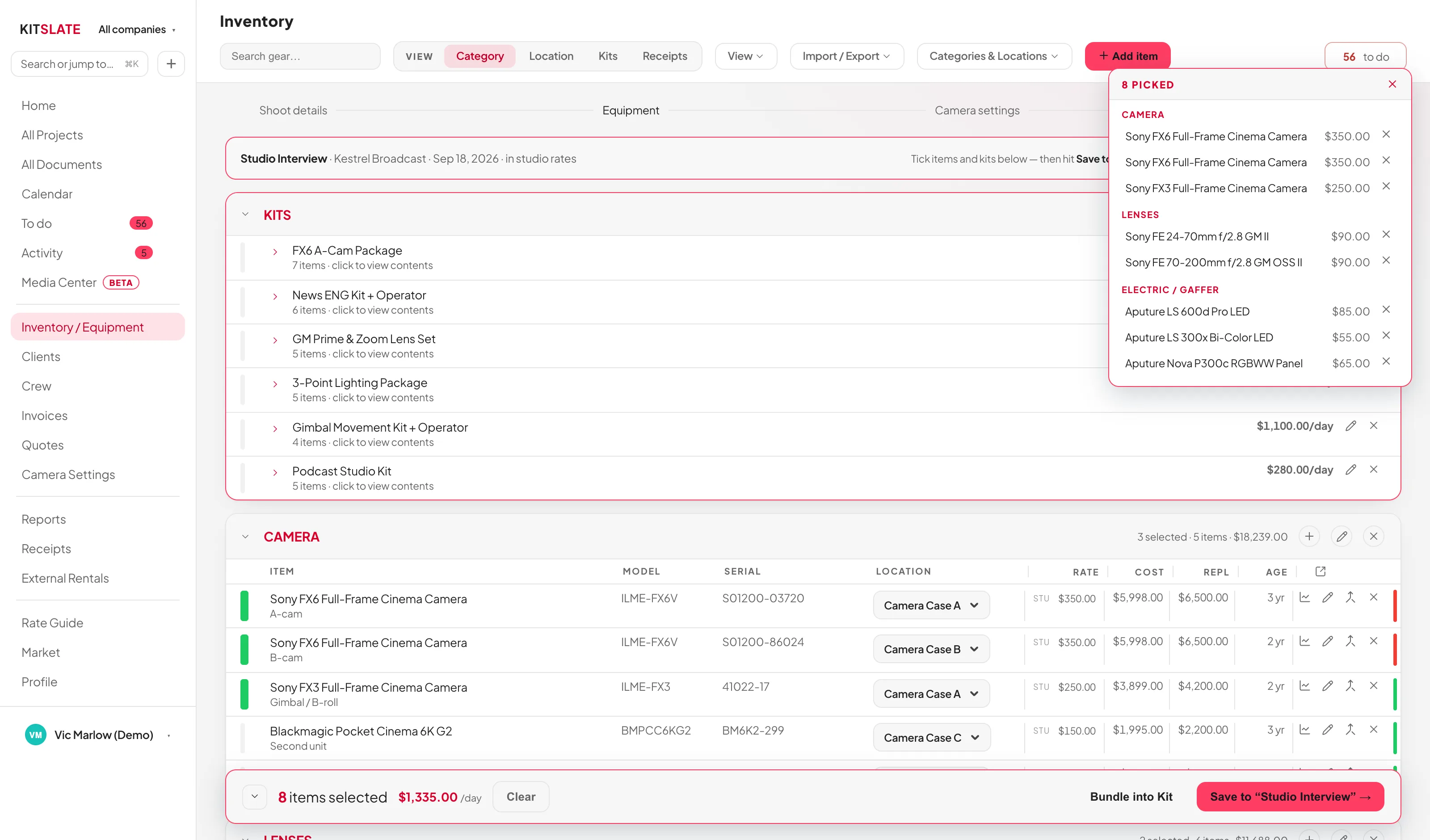
    The equipment picker on a production. The inventory on the left and the gear list tray on the right, filling with what this production takes
    ↔ drag the picture sideways to read it
  3. PACKED, SENT, RETURNED

    The list has a state, all the way back.

    A gear list is built, then packed. Ticked off case by case. And after the shoot, returned.

    Carries forward: what is still out after the job
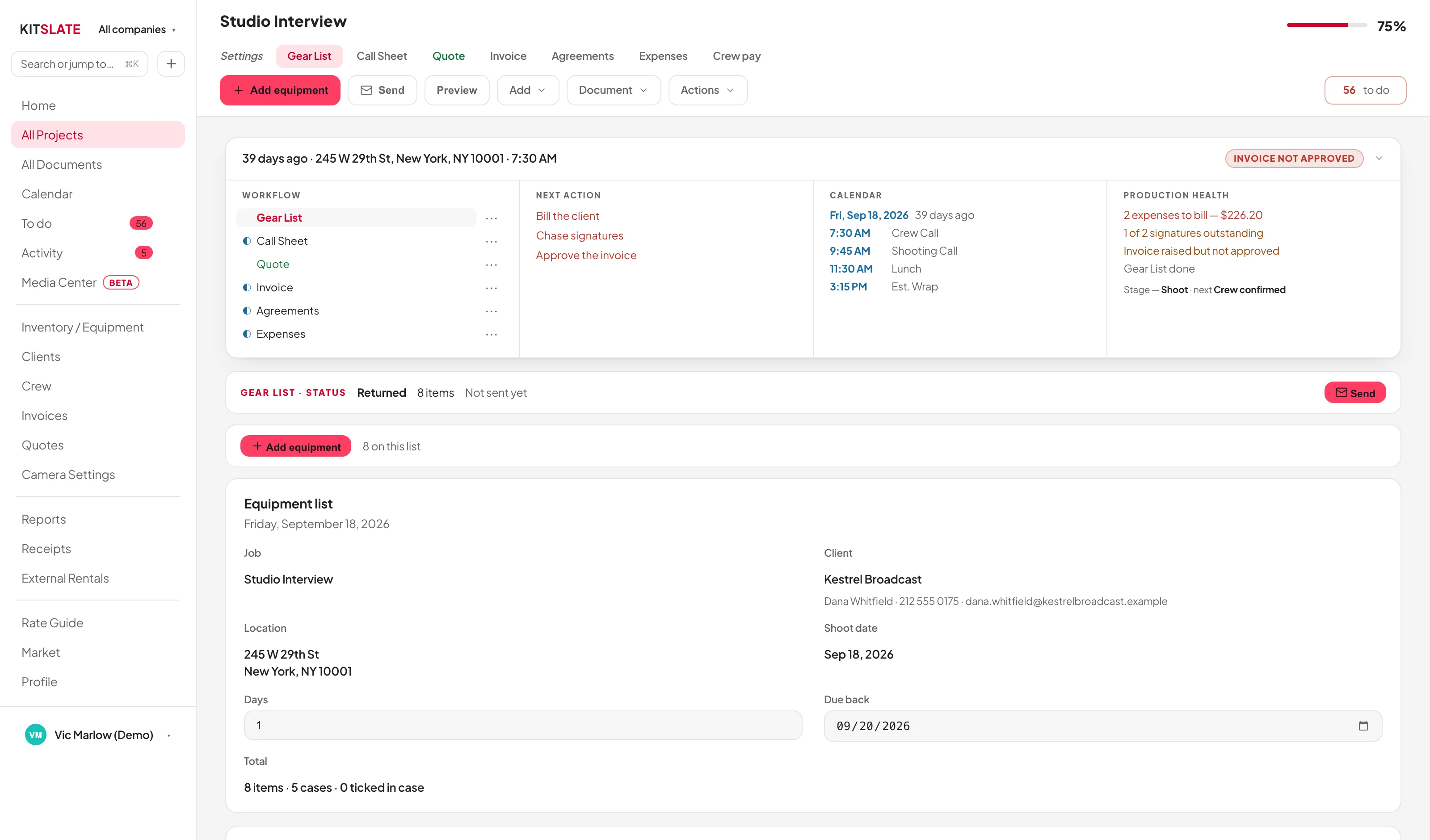
    The production's gear list. Its status band reading returned, the production checklist beside it, and the equipment list itself below
    ↔ drag the picture sideways to read it
The inventory, item by item. Camera and Lenses open, each item with its model, serial, case, day rate, cost, replacement value and age, and a status line on the right The equipment picker on a production. The inventory on the left and the gear list tray on the right, filling with what this production takes The production's gear list. Its status band reading returned, the production checklist beside it, and the equipment list itself below
Inventory · everything the workspace owns
Create Production
How would you like to start this production?
IMPORTS & INTEGRATIONS
Studio BookingTurn a booking into a production.›
Import ProductionRead a call sheet CSV or PDF.›
Import InvoiceStart from an invoice you already have.›
→
Import invoice
↓
Drop your invoice here
An invoice PDF, or a CSV your accounting software exported. KitSlate reads what it can, shows you what it found, and nothing is saved until you say so. You do not have to tell it which system the file came from.
Browse files
PDFinvoice_INV-0628-01.pdf
Review the import. Choose what comes in
Nothing is added until you press Import. Untick anything you don’t want. The invoice itself is saved to the Invoices page as an imported invoice. Read-only, kept apart from the invoices you raise, with the original document attached.
NEW JOBS FILE UNDER
Fernway (Demo)Copperline (Demo)
WHAT TO BRING IN
Equipment linesonto each job’s quote and gear list
The moneytotal, paid status and due date into the Income tracker
Show it on the jobthe job gets a read-only Invoice tab. The invoice stays your accounting system’s
LINE BY LINE
Invoice INV-0628-01Foxglove Films Ltd · 3 lines · $1,138.00 · no production matches its accounting reference. A new one is created for Foxglove Films Ltd
Beaconlink 300S06.28.26 · Beaconlink 300S encoder field unit with 5G modemsEQUIPMENT$650.00
Beaconlink 300S06.29.26 · Beaconlink 300S encoder field unit with 5G modemsEQUIPMENT$450.00
Online Processing Fee3.4% + $0.60 transaction fee · Credit Card Processing FeeOTHER$38.00
Cancel. Bring nothing inImport selected →
Equipment found on this invoice

1 invoice read. 1 new job created under Fernway (Demo) (they sit at the bottom of All Projects as history).

2 equipment lines added. 0 recognised as items you own, so that income now counts toward per-item earnings, payback and the Home tiles.

The full invoice is tracked too: $1,138.00 · Unpaid · due 2026-07-30. It’s in the Income tracker, and the job got its Invoice tab.

NOT RECOGNISED. ADD TO YOUR INVENTORY?
Tick the real equipment. Services, labour, shipping and fees are unticked already, so nothing is added unless you ask for it. Fix the name, pick a shelf: each ticked row is created in your inventory and this invoice’s income links straight to it.
NAMECATEGORYDAY RATEPAID (COST)
Beaconlink 300SCAMERA650.
Beaconlink 300SCAMERA450.
CancelAdd ticked to inventory
All Projects
WRAPPING UP
Fireside Chat, Ep. 4Kestrel BroadcastCrew confirmed
Foxglove Films Ltd. INV-0628-012026-06-30Invoice · IMPORTED
Created by the import. Dated, companied, its accounting reference already set.
→
Foxglove Films Ltd. INV-0628-01
Gear ListQuoteInvoice · WAVE
INVOICED OUTSIDE KITSLATE
This job was invoiced in Wave. KitSlate has no invoice of its own for it, and does not create one. That would be a second invoice for the same work.
INVOICEINV-0628-01 DATED2026-06-30 · due 2026-07-30 TOTAL$1,138.00  UNPAID ORIGINALView original ⬇ Download PDF
The file as it arrived from Wave. Stored with the record, read-only, kept apart from the invoices you raise.
Reports · Income tracker
INVOICEDUETOTALSTATUS
INV-1041 Wave2026-08-26$2,385PAID
INV-0628-01MATCHED2026-07-30$1,138UNPAID
Reads the files you upload. No connection to Wave, QuickBooks or Xero. Overdue is counted, not remembered.
→
The job · Gear List
IMPORTED FROM AN INVOICE2 items
Beaconlink 300S$650/day
Beaconlink 300S$450/day
On the job’s quote too. What the invoice billed is what the job carries.
InventoryImport / Export ▾   + Add item
CAMERA7 items
Sony FX6 Full-Frame Cinema CameraSN S01200-03720 · Camera Case A$350/day
Beaconlink 300SAdded from an imported invoice$650/day
Beaconlink 300SAdded from an imported invoice$450/day
Yours now. And linked back to the imported job, so this invoice’s $1,100 of equipment income already counts in per-item earnings and payback.
AND THE FASTEST WAY IN

Drop in an invoice.

One invoice, and the rest starts filling itself in. From Create Production, straight into the drop.

Review the import.

Nothing comes in until you hit Import: the equipment lines, the money and the job. Each yours to untick, line by line.

One import. Several things done.

A job created, the money tracked. And you decide which equipment becomes yours. Fees and services are already unticked.

The job exists. The invoice stays an invoice.

Filed with All Projects as history. And a read-only Invoice tab with the original attached.

The money is tracked. The gear is on the job.

Total, status and due date in the Income tracker. And every line on the job’s quote and gear list.

And what you own starts earning.

The items you ticked are inventory now. This invoice’s income counts toward per-item earnings and payback.

One document. More than one job done.

The job with its days on the calendar, the invoice read-only with its PDF, the money in the tracker and in Reports, the equipment in your inventory. Each where it belongs, ready for the next production.

AND THE FASTEST WAY IN

Drop in an invoice.

One invoice, and the rest starts filling itself in. It begins where every job begins. Create Production › Import Invoice. And takes an invoice PDF or a CSV your accounting software exported. You never have to say which system the file came from.

Import InvoiceStart from an invoice you already have.›
↓
Drop your invoice here
KitSlate reads what it can, shows you what it found, and nothing is saved until you say so.

Review the import.

Nothing comes in until you hit Import. Three choices. The equipment lines onto the job’s quote and gear list, the money into the Income tracker, the read-only Invoice tab on the job. Then whether it was already invoiced elsewhere, then every line, ticked or unticked, with KitSlate telling equipment from fees.

Equipment linesonto each job’s quote and gear list
The moneytotal, paid status and due date into the Income tracker
Show it on the joba read-only Invoice tab
Invoice INV-0628-01Foxglove Films Ltd · 3 lines · $1,138.00 · a new production is created
Beaconlink 300SEQUIPMENT$650.00
Beaconlink 300SEQUIPMENT$450.00
Online Processing FeeOTHER$38.00

One import. Several things done.

Import selected, and before you’ve typed a thing: a job created and filed with All Projects as history, the equipment lines on its quote and gear list under IMPORTED FROM AN INVOICE, and the money. $1,138.00 · Unpaid · due 2026-07-30. In the Income tracker, with a read-only Invoice tab on the job and the original PDF attached.

1 invoice read. 1 new job created (they sit at the bottom of All Projects as history).

2 equipment lines added. 0 recognised as items you own.

The full invoice is tracked too: $1,138.00 · Unpaid · due 2026-07-30. It’s in the Income tracker, and the job got its Invoice tab.

You decide what you own.

Fees and services are unticked already. Tick the real equipment and each row is created in your inventory. And this invoice’s income links straight to it, counting toward per-item earnings and payback.

NAMECATEGORYRATEPAID
Beaconlink 300SCAMERA650.
Beaconlink 300SCAMERA450.
Add ticked to inventory

Then follow it anywhere.

The invoice did not disappear: the job carries a read-only Invoice tab with View original opening the PDF you dropped, the Income tracker carries the money, the gear list carries the lines. And the equipment you ticked is inventory now, already earning against this invoice. The job’s shoot days sit on the calendar, Reports carry it under Imported from files with what has been paid against it. And because you said it was already invoiced elsewhere, KitSlate never asks you to approve or send one of its own.

Foxglove Films Ltd. INV-0628-012026-06-30Invoice · IMPORTED
TOTAL$1,138.00  UNPAID ORIGINALView original
IMPORTED FROM AN INVOICEon the job
Beaconlink 300S$650/day
Beaconlink 300S$450/day
CAMERAinventory · yours now
Beaconlink 300SAdded from an imported invoice$650/day
Beaconlink 300SAdded from an imported invoice$450/day
One document, more than one job done. The job, the invoice, the money and the equipment, each where it belongs.

Once it’s in KitSlate, the information keeps moving.The production the import just created is the same production the paperwork is built from.

03 · PAPERWORK . Quotes, call sheets, agreements

Each document inherits the one before it.

This is the part that usually costs an afternoon: the same names, dates, rates and addresses typed into three different files.

THE JOB

Production

Client, dates, studio, crew. And the gear list you just watched fill.

hands on → everything below
PRICING

Quote

Equipment, crew, studio and fees, priced from the gear list.

hands on → lines and totals
THE DAY

Call sheet

Times, venue, schedule, contacts, safety, meals. And the weather.

hands on → the cast and crew
SIGNING

Agreements

Talent and location releases, or wording of your own.

hands on → who is cleared
BILLING

Invoice

Numbered and dated, frozen from the approved quote.
ends at → paid
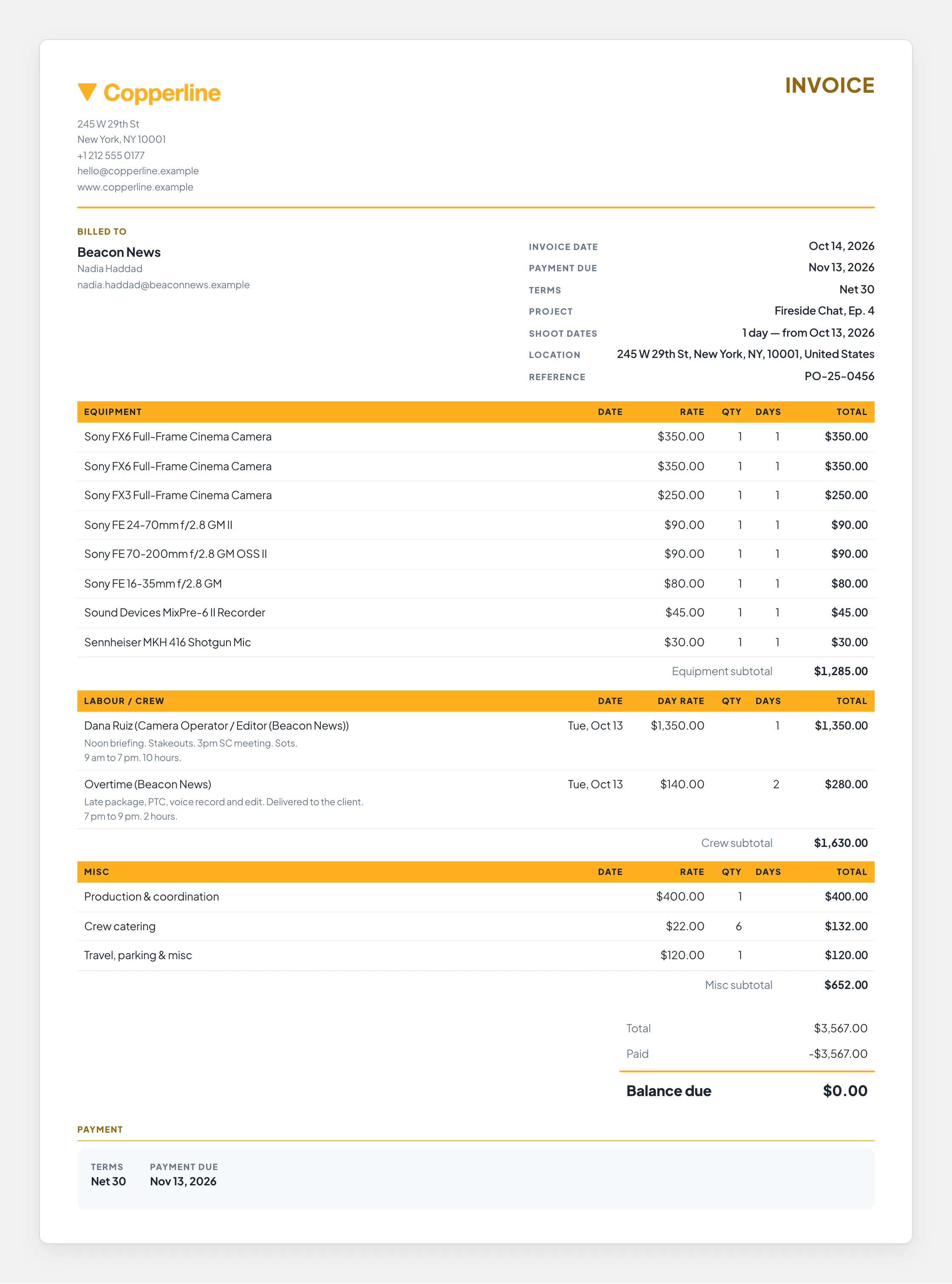
THE QUOTE THAT GOES OUT
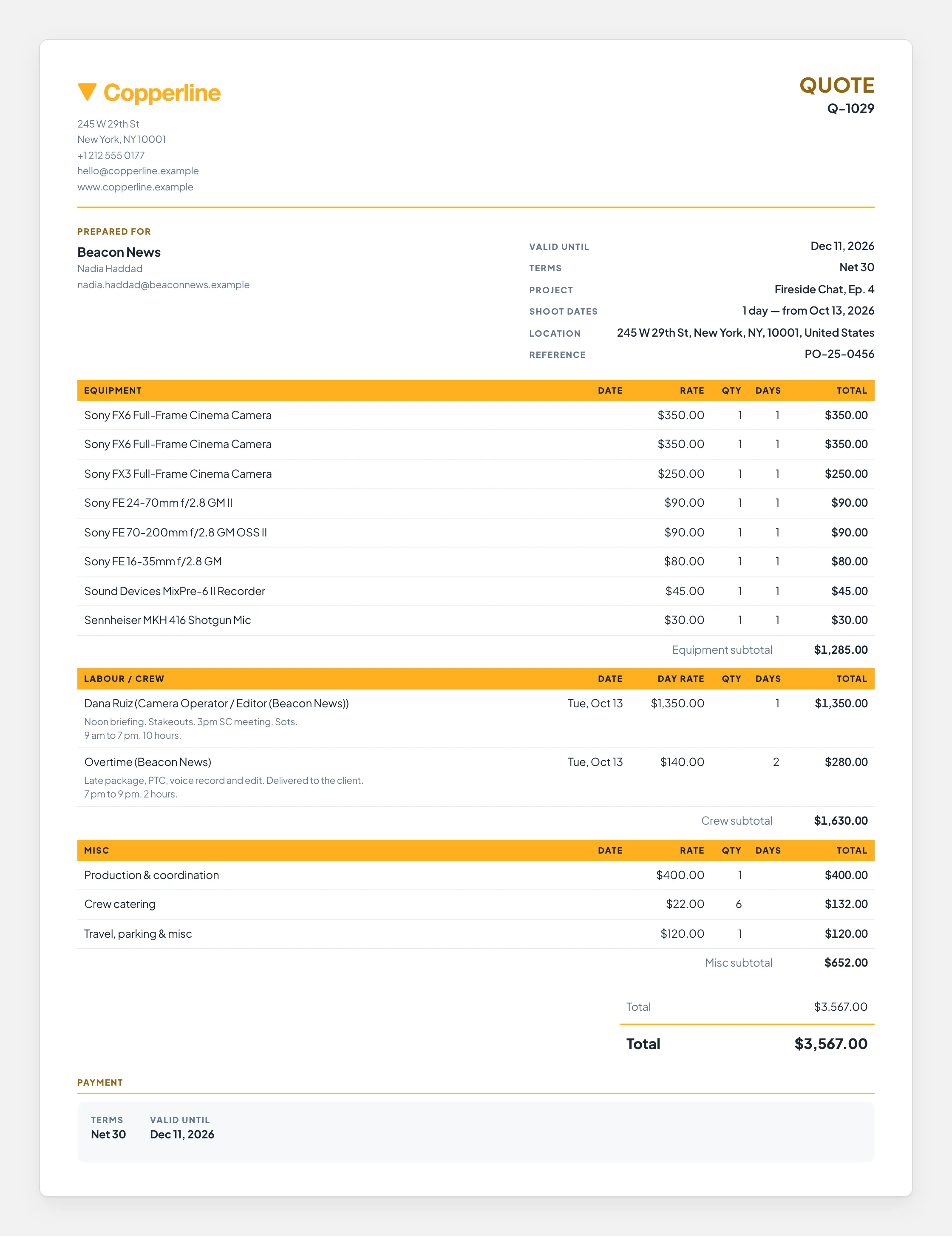
Quote · Copperline (Demo)
A branded production quote. The company and client at the top, then equipment, labour and miscellaneous line items with their subtotals, then the total and the payment terms

The top. The company sending it, the client, the production and the terms

The middle. Equipment, labour and misc, line by line, with subtotals

The bottom. The total, and when and how it is to be paid

The quote in full. The company and client, every line item with its subtotals, the total and the terms

Goes out as branded email from the company that owns the job, with a PDF attached.
↔ drag the document sideways to read the amounts
THE CALL SHEET THAT GOES OUT
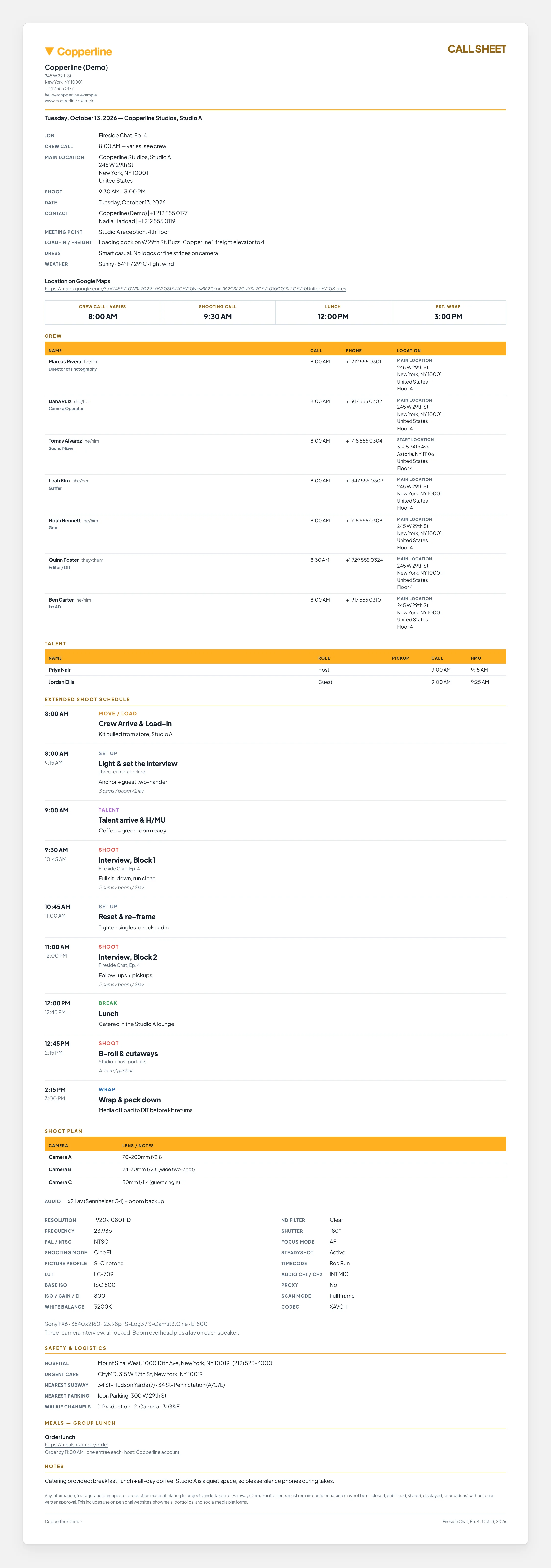
Call Sheet · Copperline (Demo)
The finished branded call sheet. The production, venue, address and key call times at the top, then the crew and talent tables and the shoot schedule, then the rest of the day with safety notes and meals

The top. Production, venue, the address and the four call times

The middle. Crew and talent with their own call times, then the schedule

The bottom. The rest of the day, safety, meals and the notes

The call sheet in full. Call times, crew and talent, the schedule, and the safety, meals and notes below it

Goes out as branded email with a PDF attached. And each recipient also gets their own live page.
↔ drag the sheet sideways to read the columns
kitslate.app/app · Call Sheet
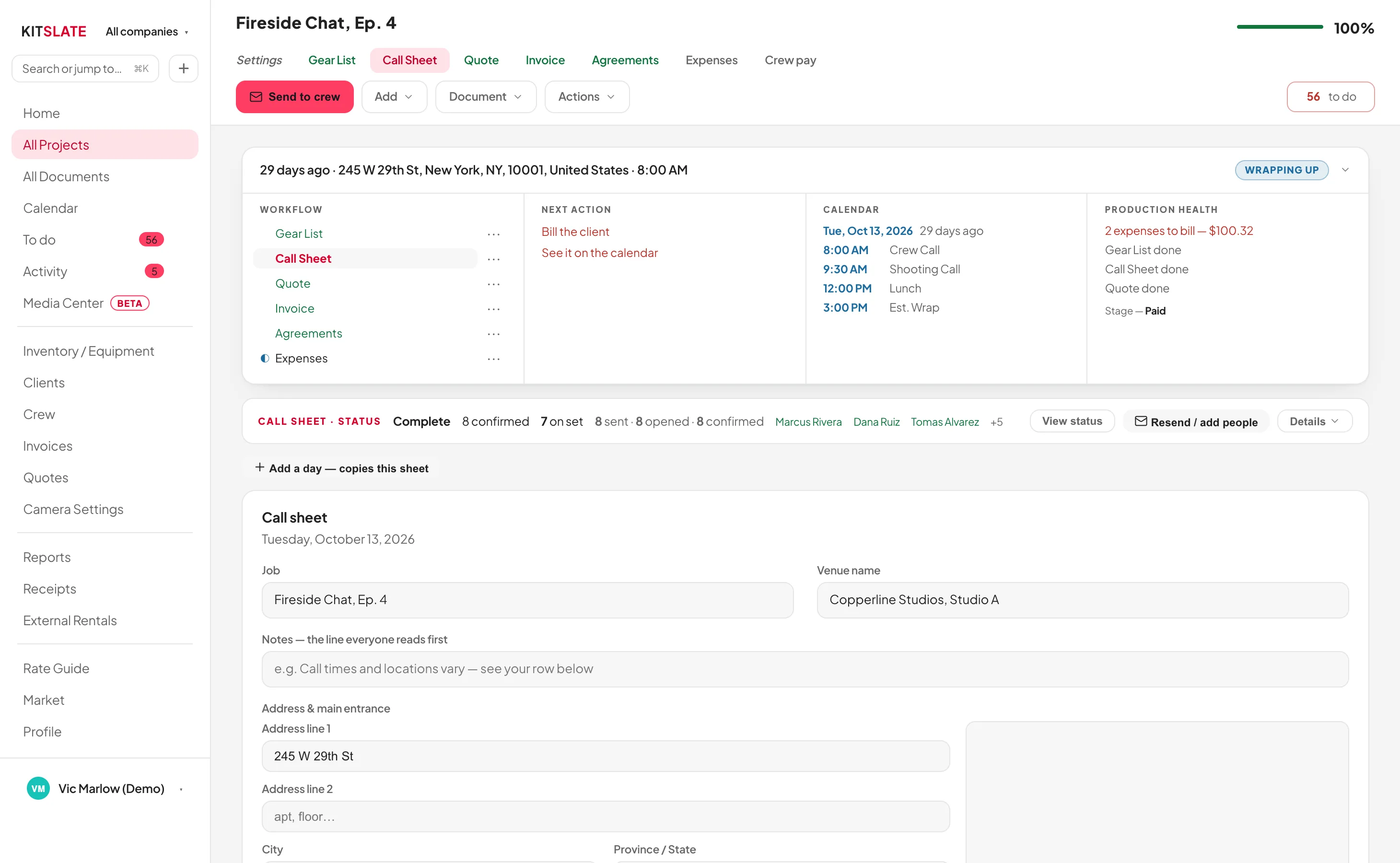
The call sheet editor in the app. The production's workflow and next actions above, per-recipient confirmation tracking, and the sheet built on cards below with the printed sheet previewed at the foot
You build it here, card by card; the sheet above is what it renders to, previewed at the foot of the page
AGREEMENTS

Anything that needs signing, signed on a phone.

A talent release, a location release, a studio hire, a production services agreement or wording of your own. One signing system for all of them, and on a production that already has a call sheet, one tap pulls the cast in.
WHO HAS SIGNED
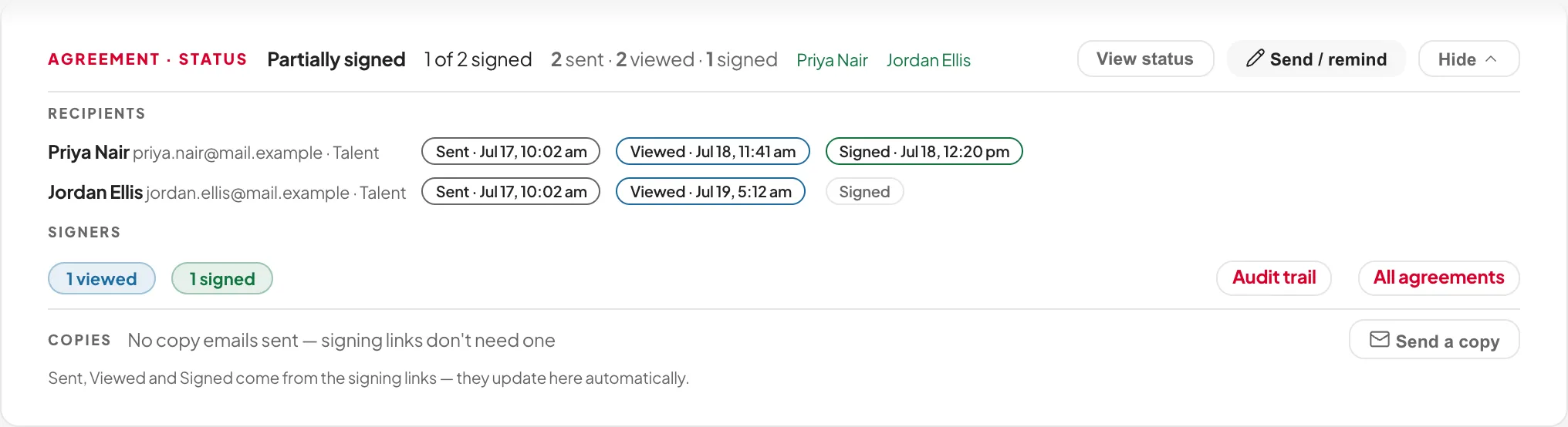
kitslate.app/app · Agreements
The agreement status card. Partially signed, one of two, with Sent, Viewed and Signed stamped with times against each signer by name
Sent, viewed, signed and still out. Name by name, with times
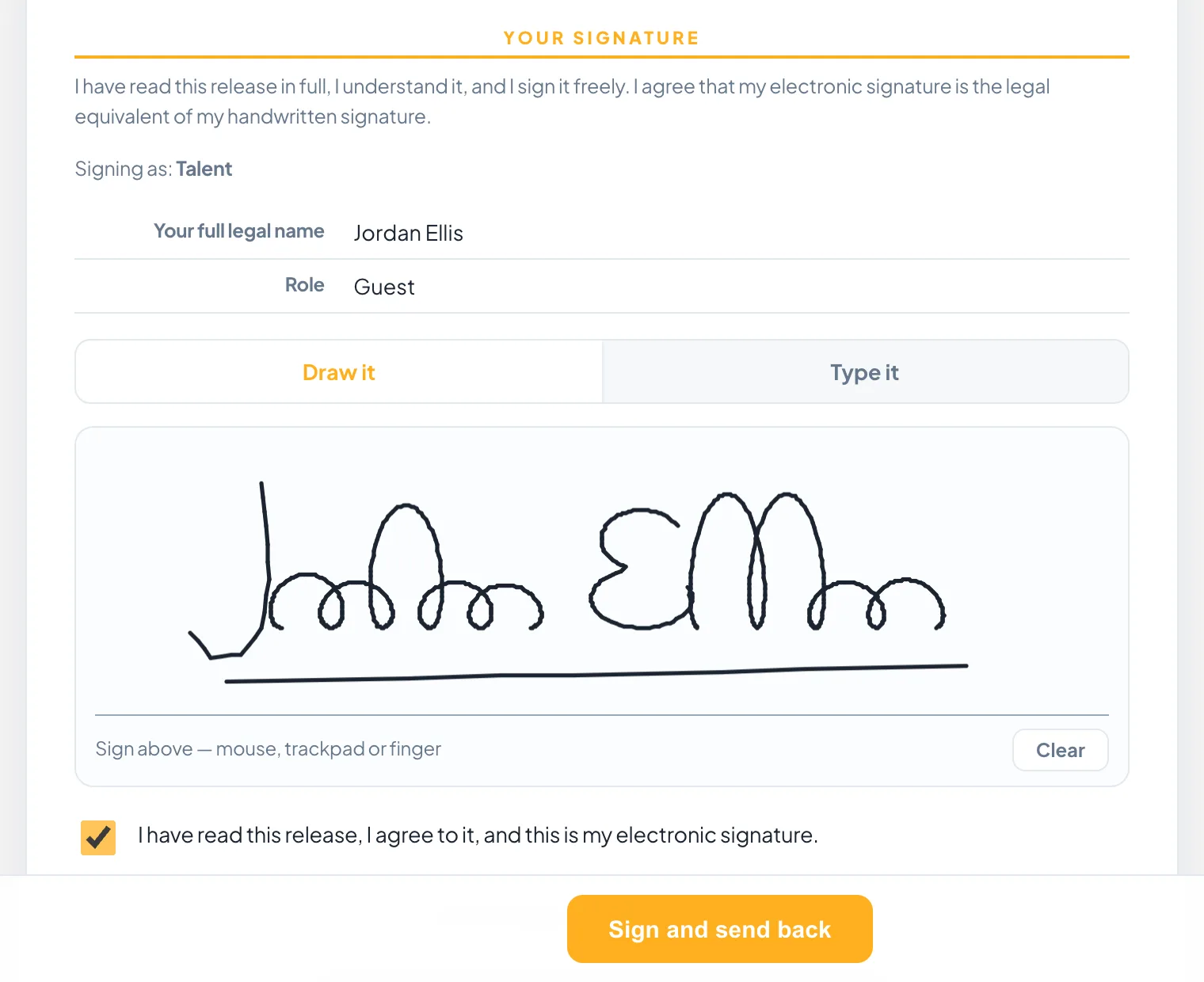
WHAT THE SIGNER OPENS
kitslate.app · sign
The signing page a recipient opens. The consent statement, who they are signing as, their name and role, a signature drawn in the pad and the agreement ticked
Their own link. No login, no account, phone or laptop
WRITTEN ONCE

The template holds the wording. The production fills in the rest.

A template belongs to no company and no job.
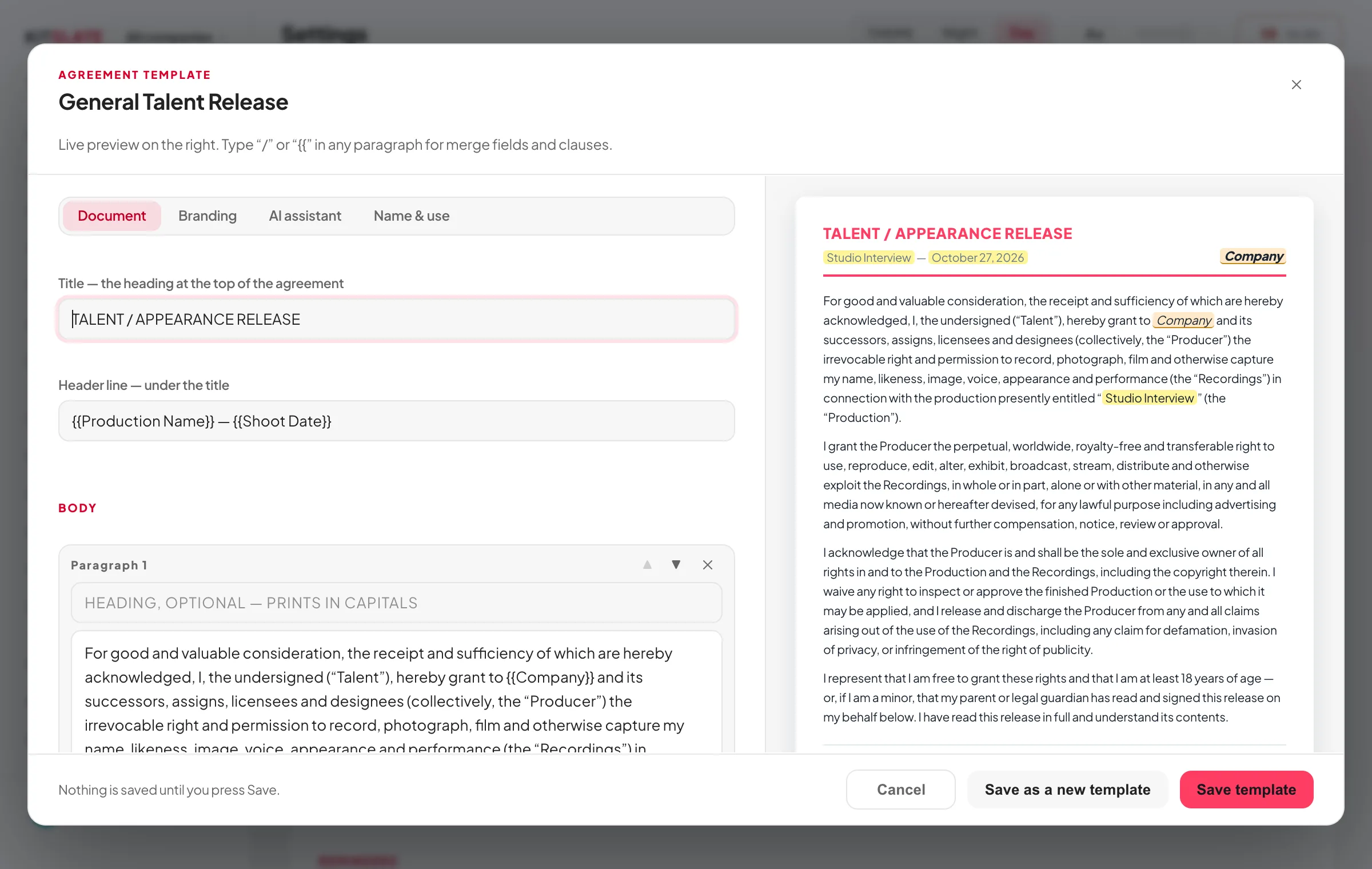
THE AMBER FIELDS FILL THEMSELVES
kitslate.app/app · Agreement template
The agreement template editor: the Document tab with title, header line and body paragraphs on the left; on the right the live preview, where Company is highlighted in amber wherever it appears because the template holds no company
Company and deal terms. Marked in the template, supplied by the job
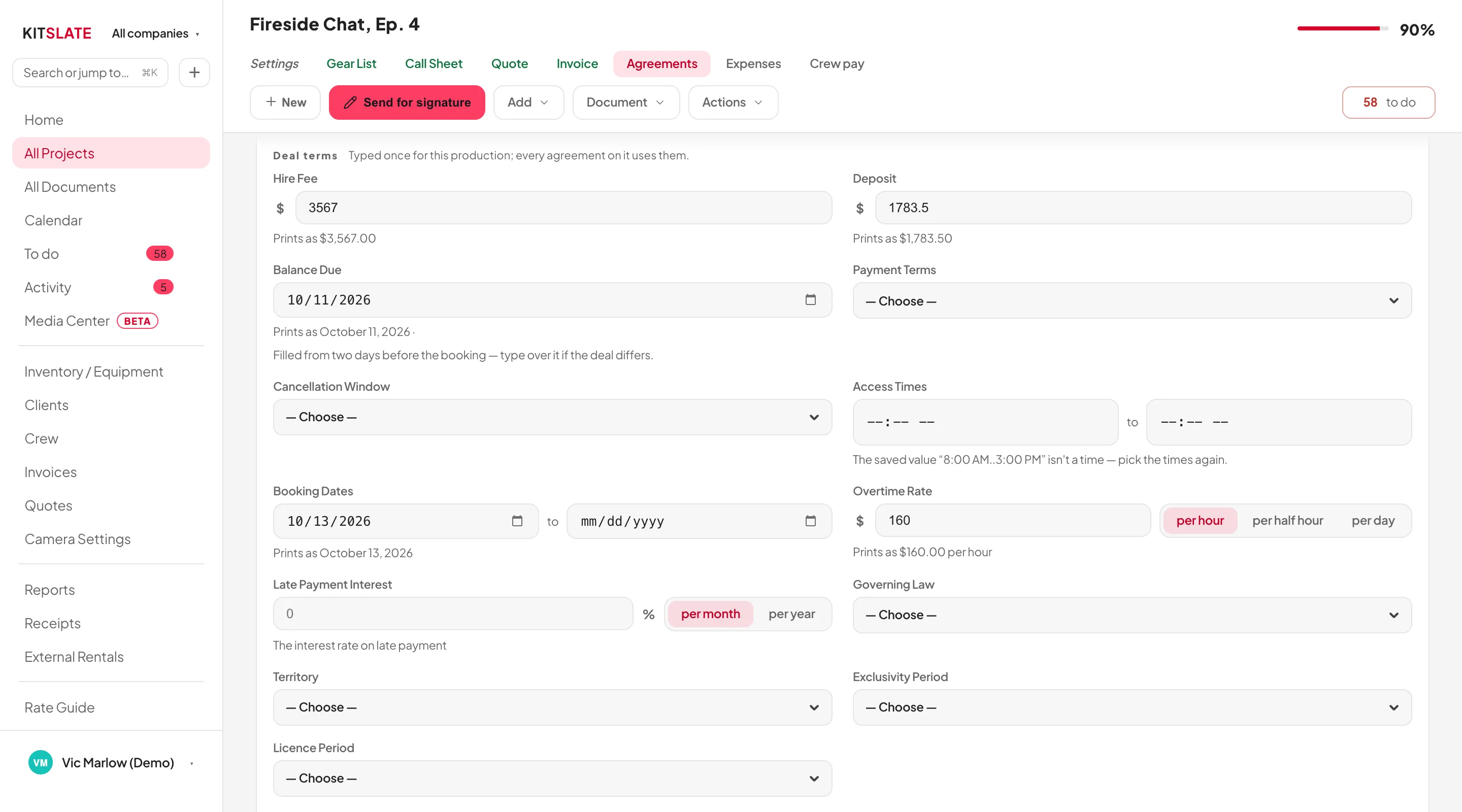
THE DEAL TERMS, ALREADY IN
kitslate.app/app · Agreement details
The agreement details panel on a production, at the Deal terms group: hire fee and deposit filled from the quote, balance due two days before the booking, access times filled from the call sheet's first and last call, booking dates and an hourly overtime rate. Each filled value with a line saying where it came from
Fee from the quote, dates from the booking, access times from the call sheet
04 · SEND & CONFIRM . What the ticks mean

You send it. KitSlate follows it.

That paperwork is only worth anything once it reaches people.
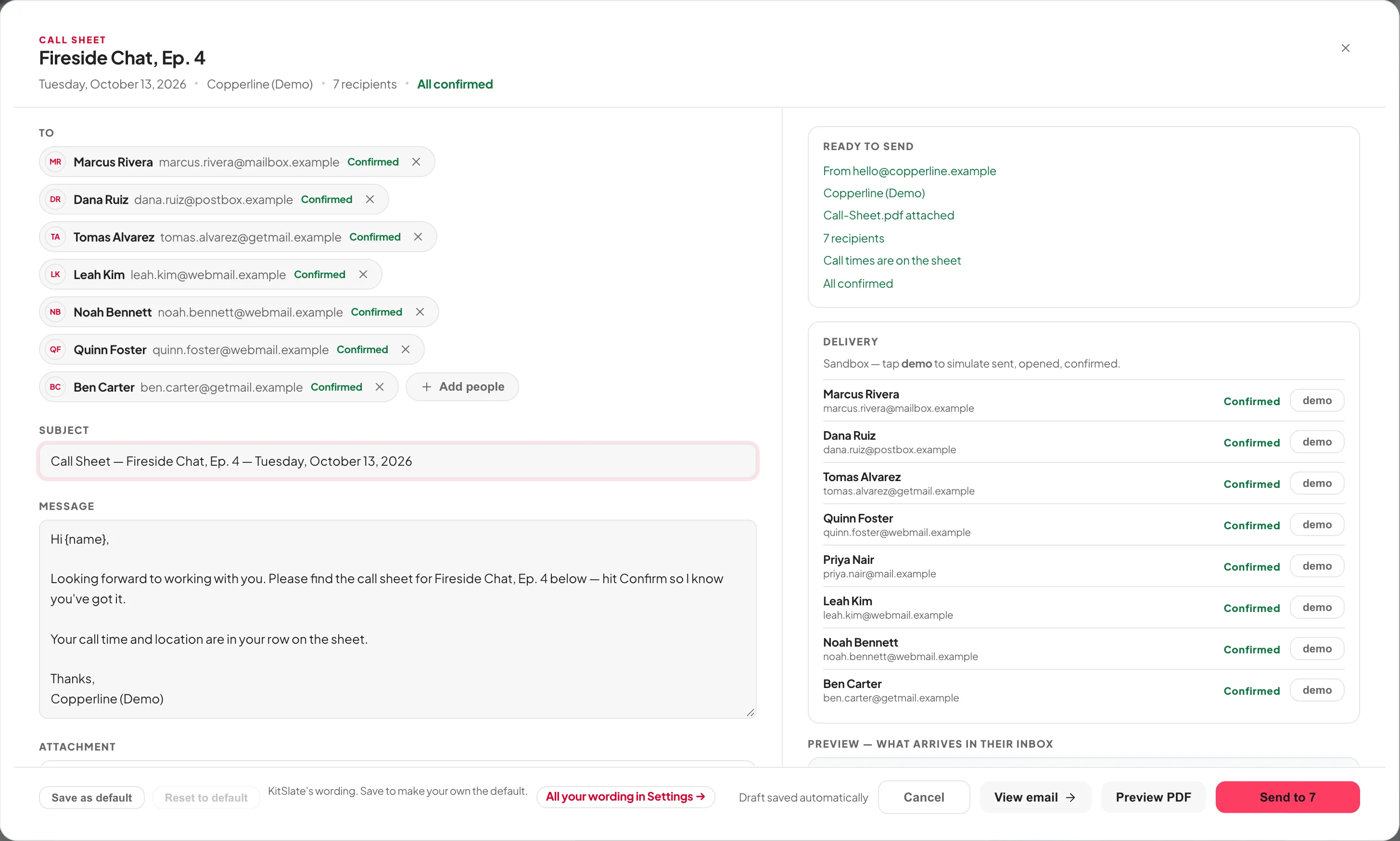
ONE TAP. EVERY RECIPIENT AT ONCE
kitslate.app/app · Send call sheet
The send window. Every crew member as an individual recipient, the subject and message, the PDF attached, the sending company, per-recipient delivery states, and a live preview of what arrives in their inbox
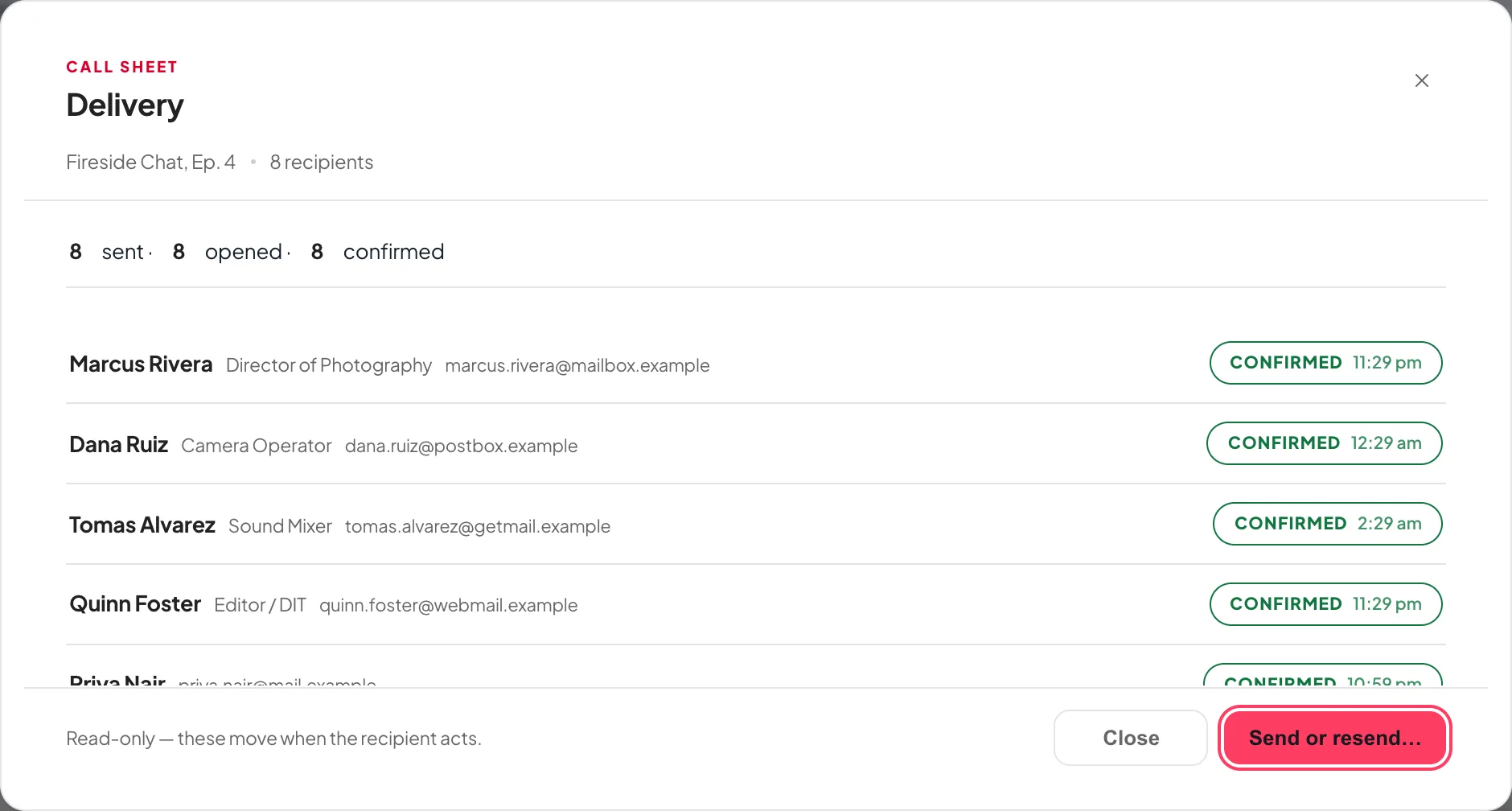
AND WHAT CAME BACK
kitslate.app/app · Delivery
The delivery window. Sent, opened and confirmed with the state and the time against each crew member's name
Moves on its own, name by name, with the time it happened
ONE EMAIL

Everything you need from one person, in one send.

Their details, the quote, the agreement, the invoice. Send with… puts them in one email, and each stays its own KitSlate document, signed, paid and tracked exactly as if sent alone.
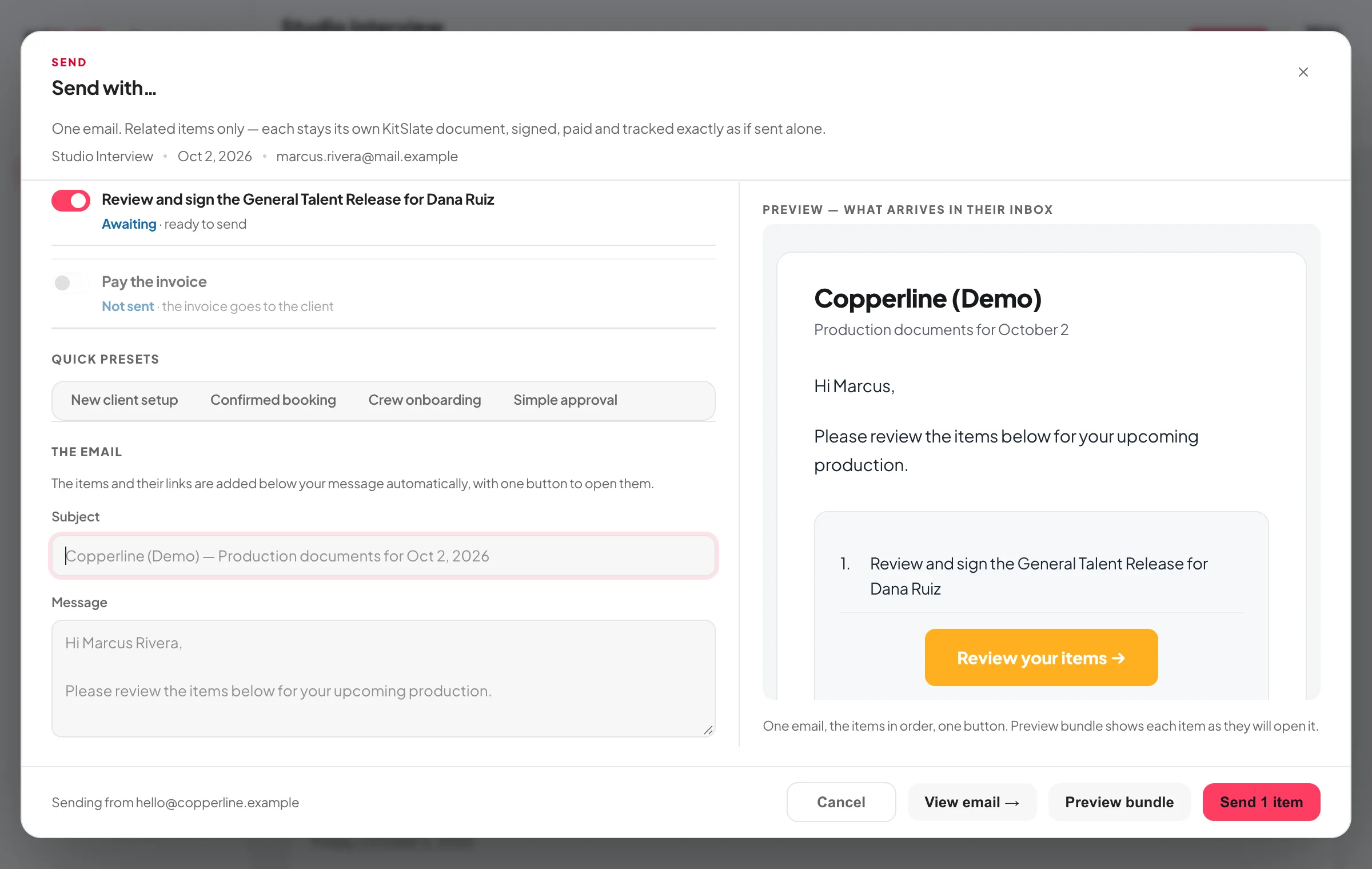
WHAT YOU PICK
kitslate.app/app · Send with…
The Send with… dialog: the people on the production to choose from, then a switch per item. Confirm your details, crew details, review the quote, review and sign the agreement, pay the invoice. With greyed rows saying why an item cannot go, and a Send 1 item button
A greyed item says why it cannot go. Already approved, already paid, not a signer
WHAT THEY GET
kitslate.app · their page
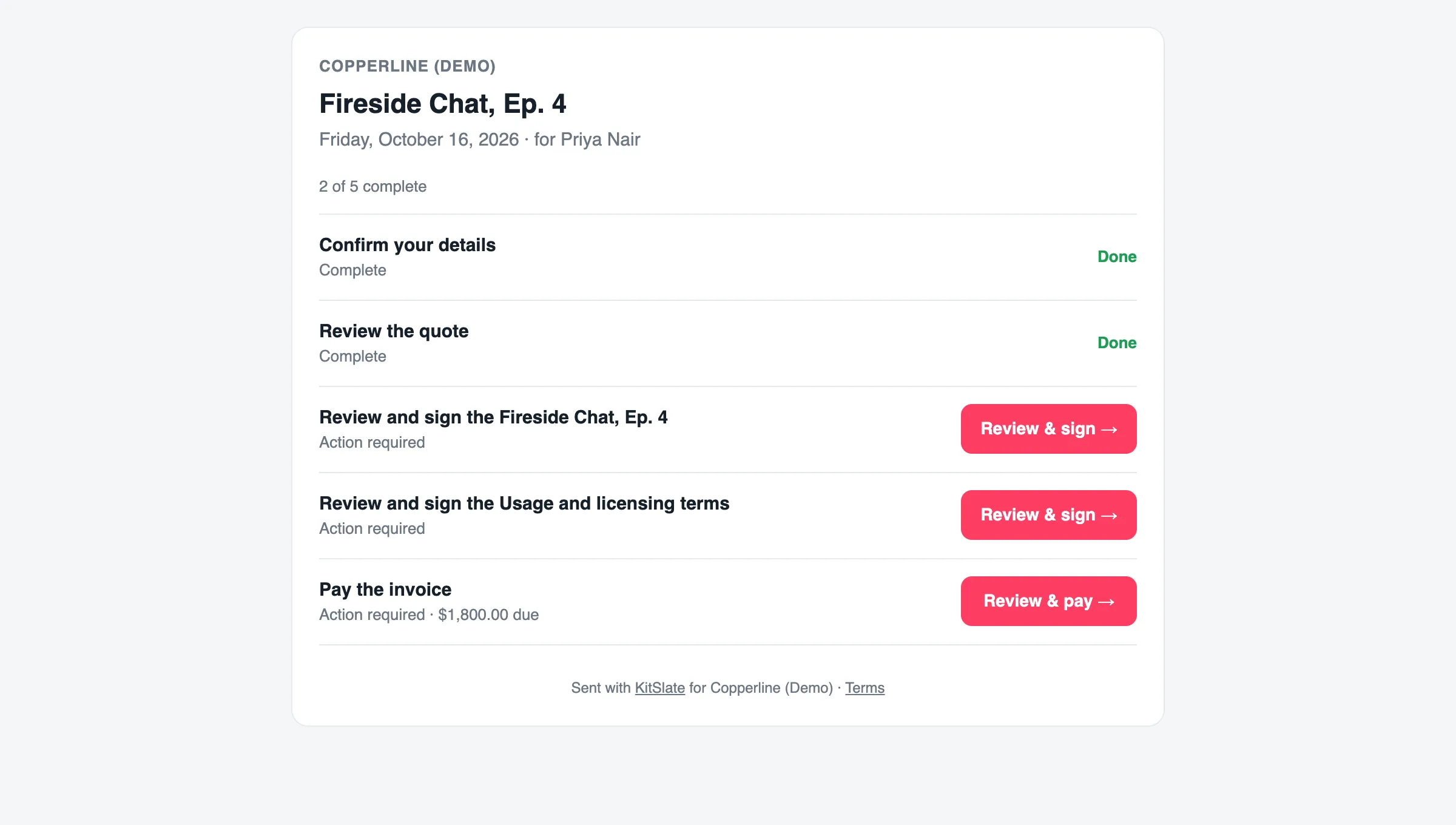
The recipient’s page: the production and date, 2 of 5 complete, then five rows. Confirm your details and Review the quote marked Done, two agreements each with a Review & sign button, and the invoice with the amount due and a Review & pay button
Done, still to do, one button each. At a link that does not go stale
WHAT COMES BACK

When they finish, they get a receipt. So do you.

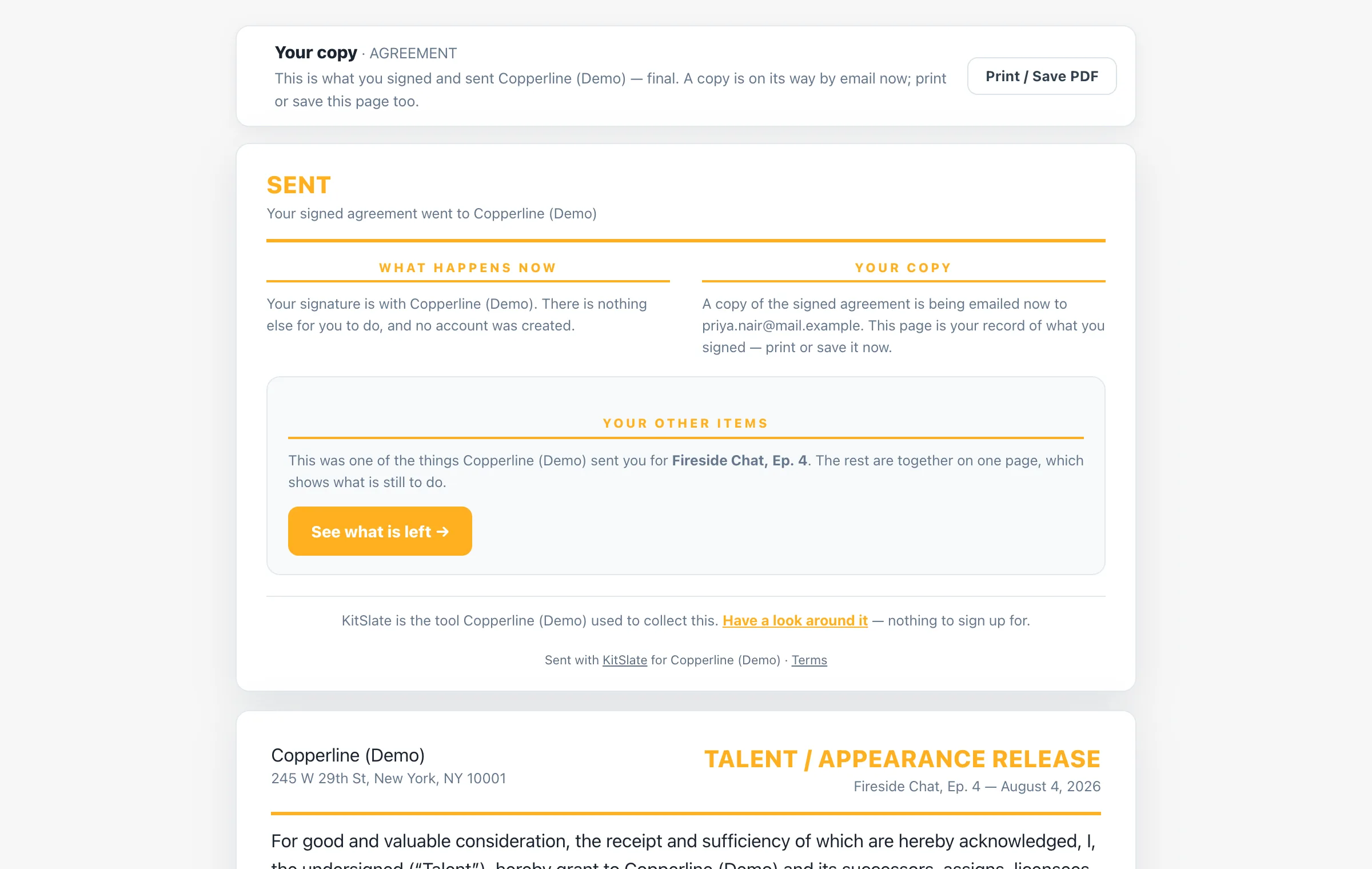
Every form ends the same way: a Sent card saying what went to you and what happens now, the way back to their other items, and the complete form as they sent it. With print or save as PDF offered only now, when there is something final to print.
THEIR RECEIPT
kitslate.app · receipt
A signer's receipt after submitting an agreement: a Your copy banner with a Print / Save PDF button, a SENT card with What happens now and Your copy columns, a Your other items panel with a See what is left button, and the complete agreement as sent beneath
Sent on top, the details below, the way back to the rest
YOUR SIDE OF IT
kitslate.app/app · Agreements
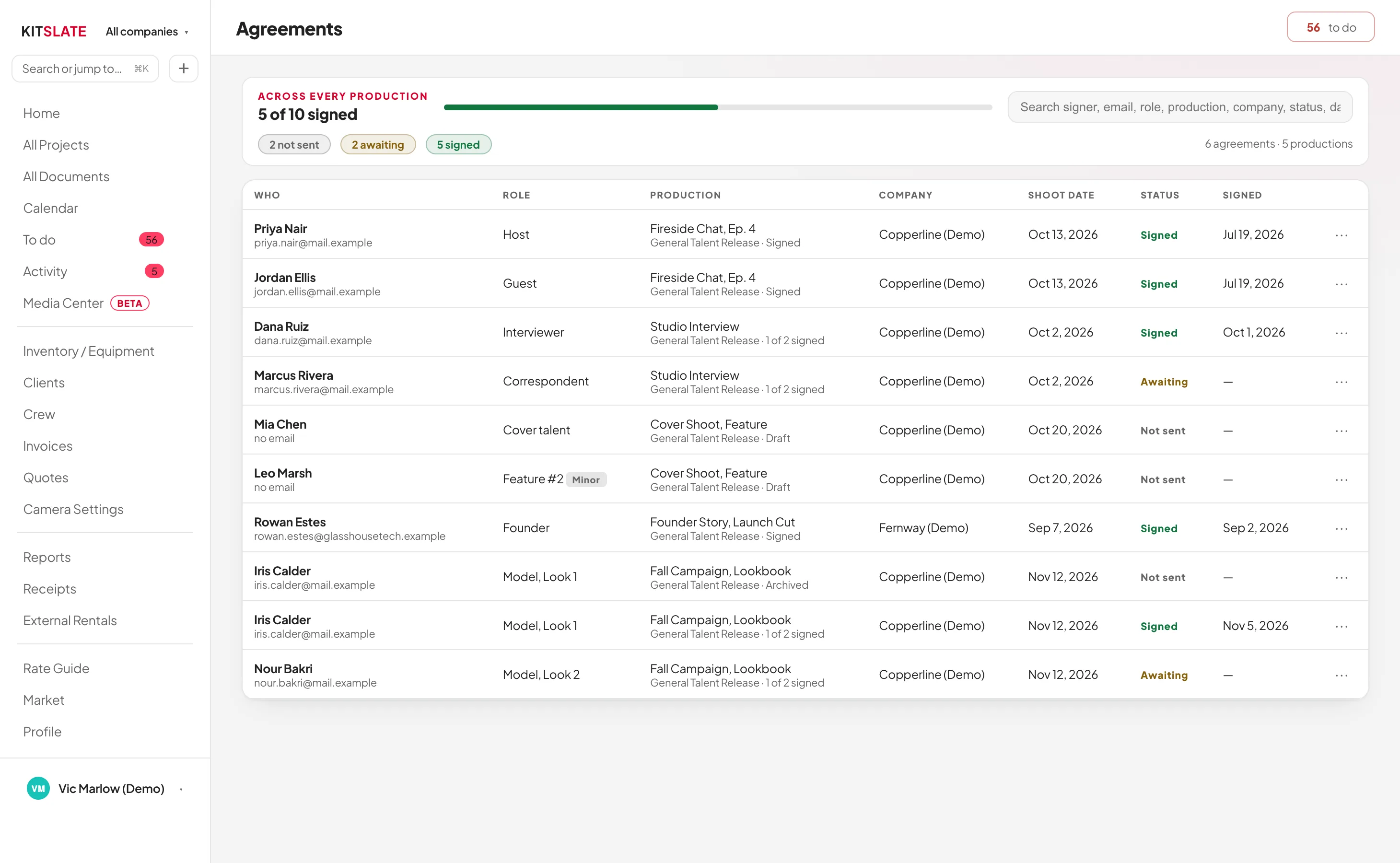
The Agreements list across every production. Five of nine signed, with Not sent, Awaiting and Signed counts; both signers on Fireside Chat, Ep. 4 now read Signed with the date, beside the ones still awaiting
Signed, with the date. Moved on by itself, beside everything still out
WHAT ARRIVES

Every send arrives two ways.

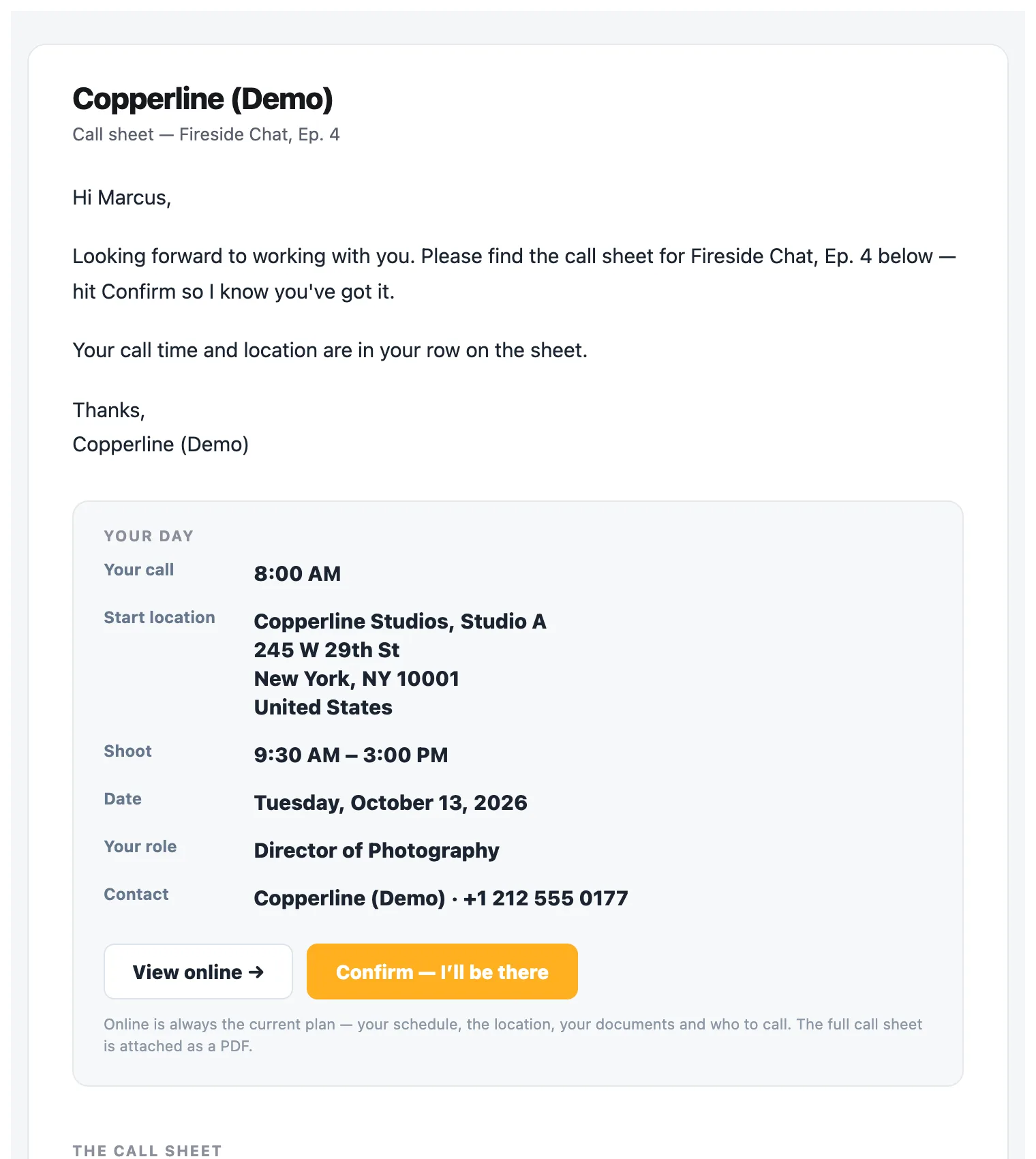
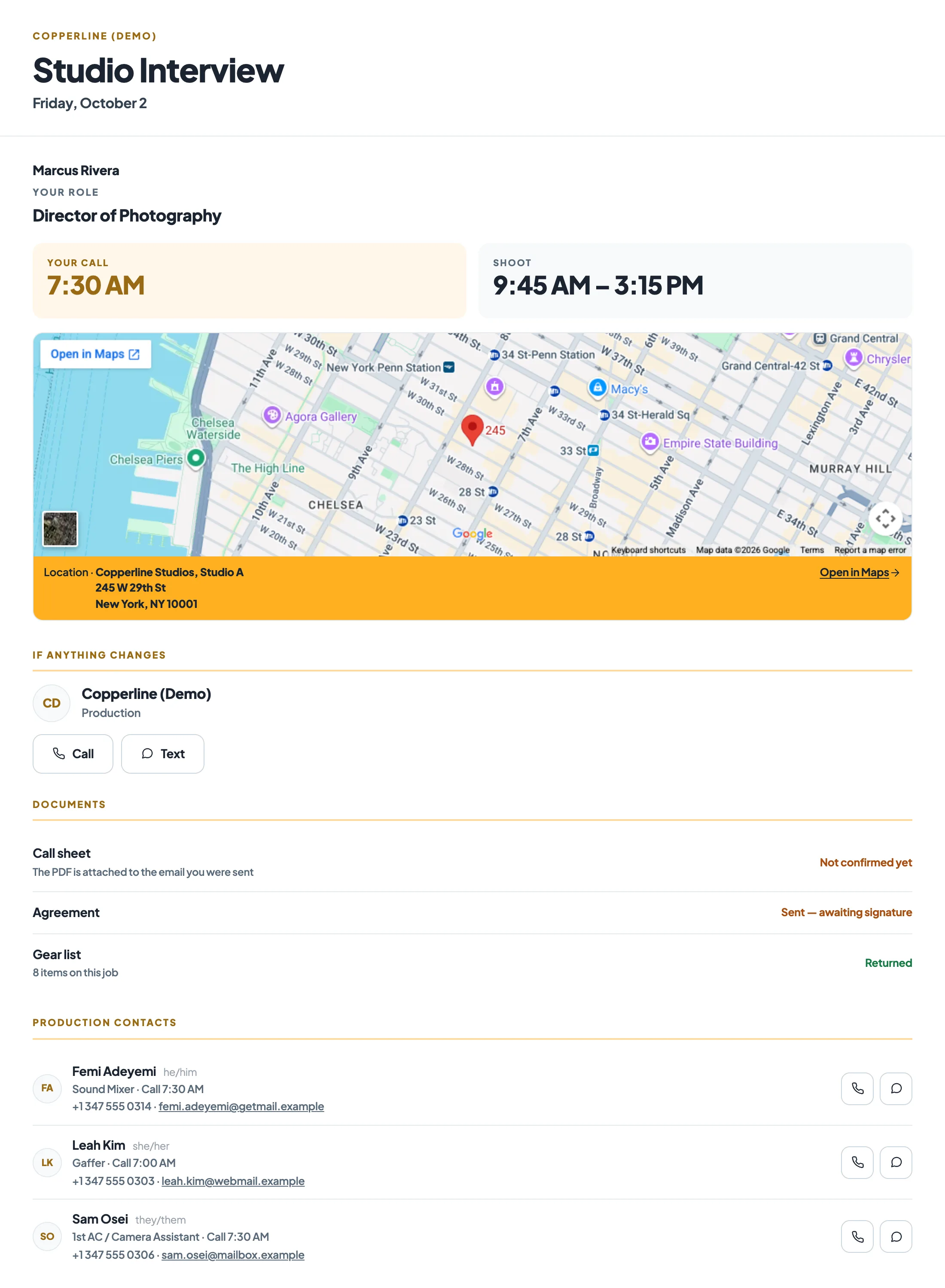
The same call sheet reaches a person as a PDF they can keep, print or forward, and as their own live page. The current plan, their call time, their schedule and their documents, at a link that does not go stale.
THE EMAIL, PDF ATTACHED
Inbox · Call sheet. Fireside Chat, Ep. 4 · Call-Sheet.pdf
The call sheet email as it arrives: the company, a greeting by first name and the message, then a Your day card with their own call time, start location, shoot hours, date, role and who to call, and View online and Confirm. I'll be there buttons; the full call sheet is attached as a PDF
Their own call time on top, Confirm a tap away, the whole sheet attached as a PDF to keep
AND THEIR OWN LIVE PAGE
kitslate.app · their production brief
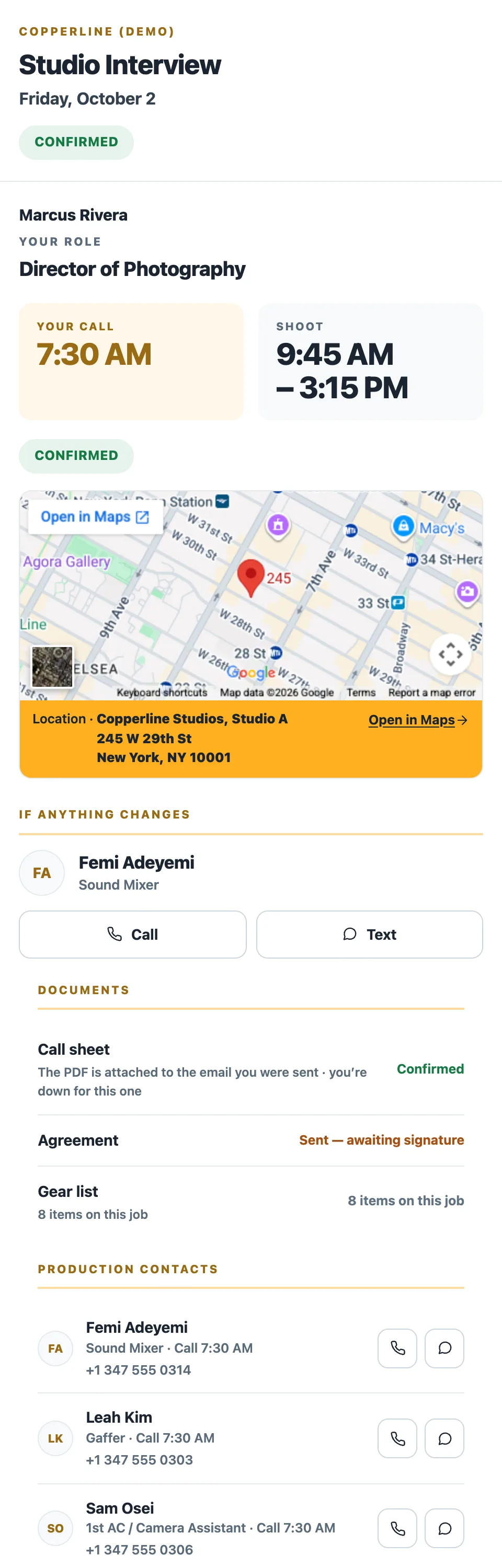
The same production brief on a laptop. The production and date, the recipient's role and call time, the location with a maps link, who to call if anything changes and their schedule
The same brief on a phone. One responsive page, not a separate mobile copy
The same page on whatever they are holding. The plan as it stands now
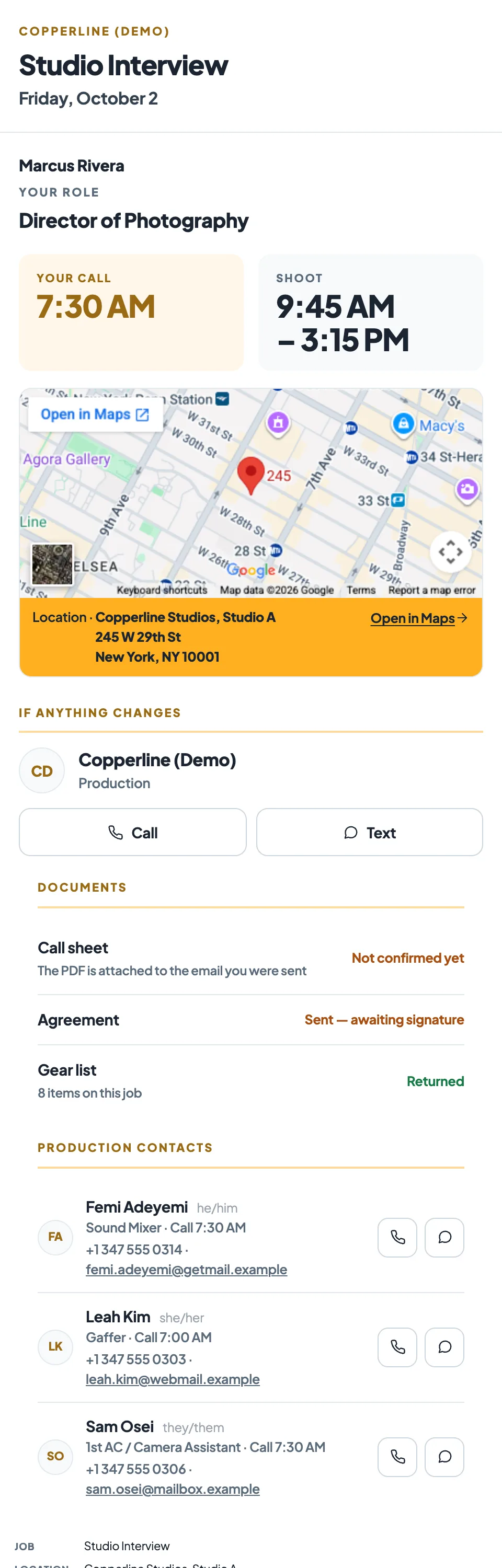
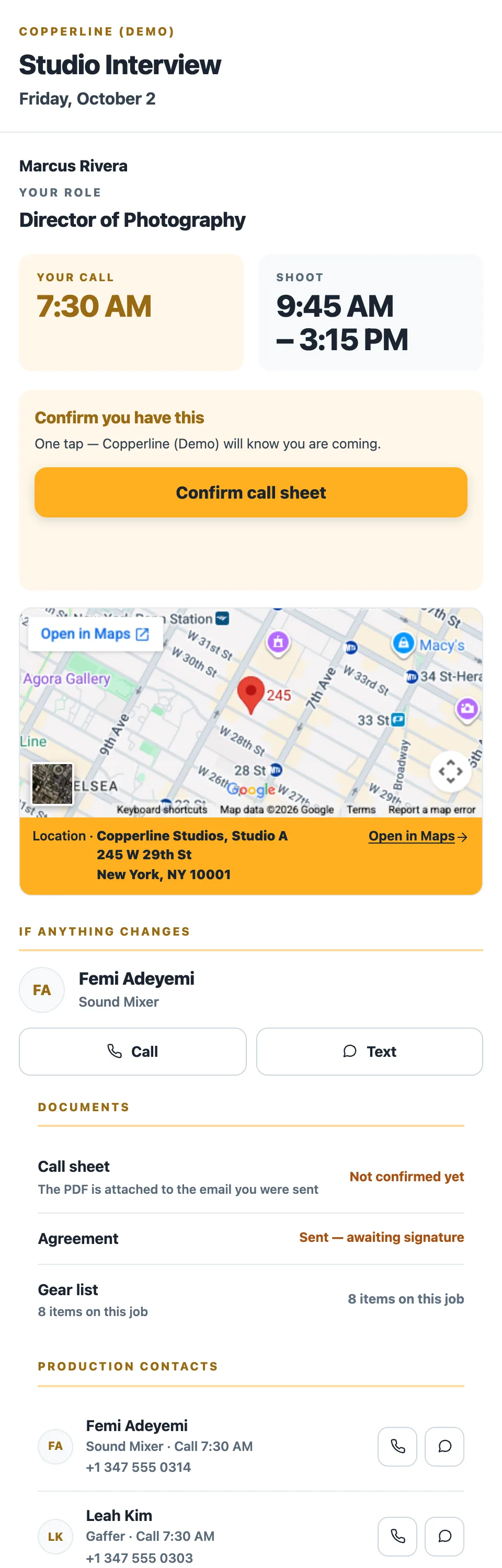
THEIR BRIEF. AND THE CONFIRM ON IT
A recipient's production brief on a phone. Their role and call time, then a Confirm you have this bar with a Confirm call sheet button, then the location, contacts and their schedule The same brief after tapping. The bar replaced in place by a CONFIRMED chip

Their link opens their brief. And the confirm sits on it, under their call time

One tap. And the button becomes the state, in place. No login, no account, nothing to install.

AND WHAT KITSLATE SHOWS YOU
ONE SEND · CALL SHEET Fall Campaign. Lookbook
5 sent · 0 opened · 0 confirmed
Marcus RiveraDirector of PhotographySENT
Leah KimGafferSENT
Quinn FosterSoundSENT
Priya NairProducerSENT
Noah Bennett1st ACSENT

Each person gets their own email, addressed to them, with their own call time and their own start location up top. The main location unless theirs differs. With the sheet below it and a PDF attached. No group thread and no reply-all.

THE STATUSES

Every document has its own finish line.

The ticks are not decorative and they are not all the same.

Call sheetto crew and talent
SENTOPENEDCONFIRMED
Signature requesttalent & location releases
SENTVIEWEDSIGNED
Invoiceto the client
SENTVIEWEDPAID
Quoteto the client
SENTREPLIED
Equipment listto a rental house or driver
SENTREPLIED

KitSlate only shows a status it can actually measure. Where a document has no real open tracking it says so rather than printing a nought nobody counted, and anything that fails to deliver says Failed, against the name it failed for.

05 · THE DAY . The day itself, and the record

The job does not go quiet once the paperwork is out.

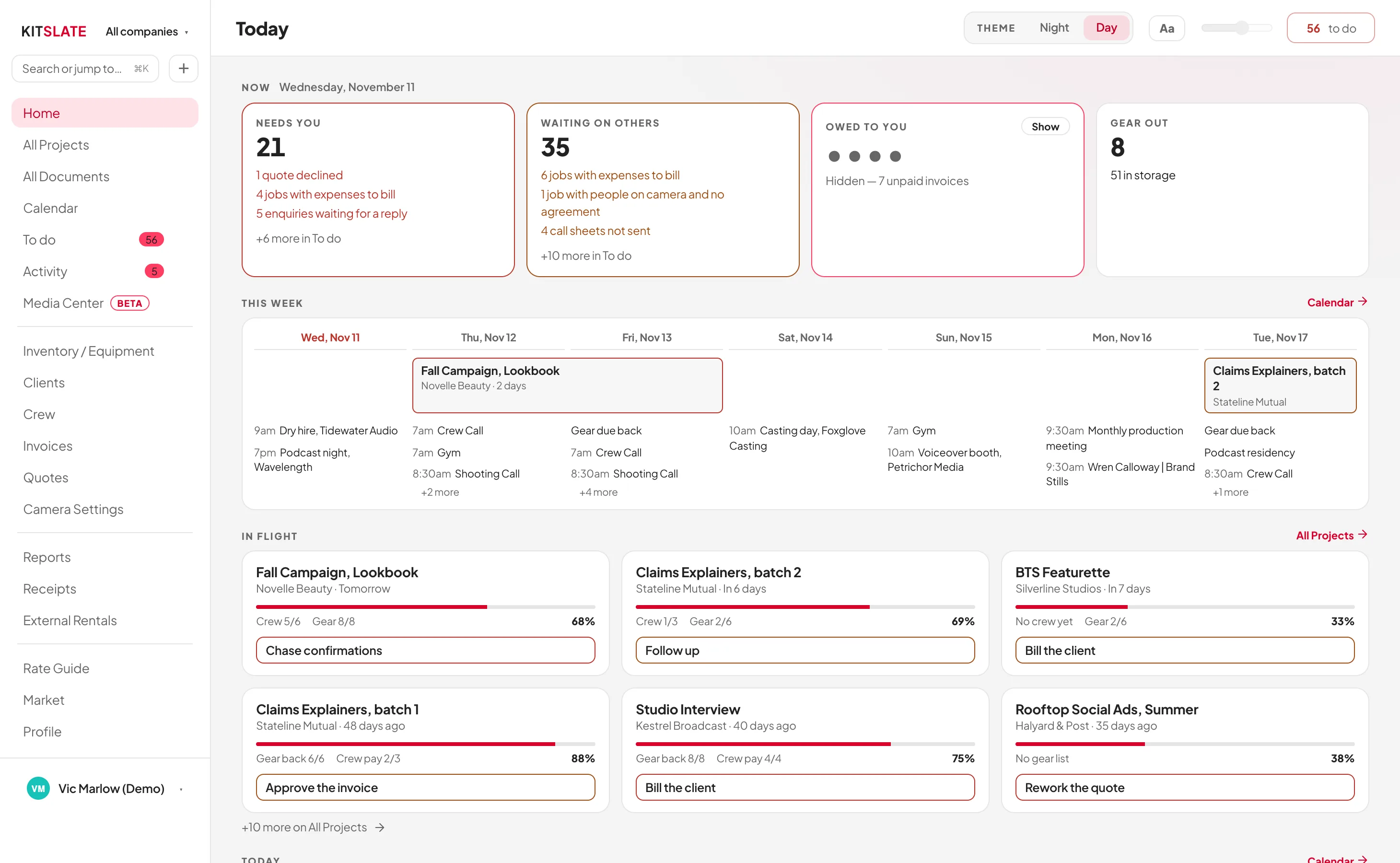
On the morning of a shoot the question is not “what did I send?” but “what is happening today, and what still needs a hand?” Today answers that first: what is shooting, who is working, what is still out of the store, what is unread, and two lists: what needs you, critical first, and what is waiting on others.
kitslate.app/app · Today
The Today dashboard. Needs you, Waiting on others, Owed to you and Gear out across the top, then the week ahead with each day's calls, and the productions in flight with how far along each is and its next step
The week reads from the productions themselves. Crew call, shooting call, gear due back
THE RECORD. ACTIVITY
kitslate.app/app · Activity
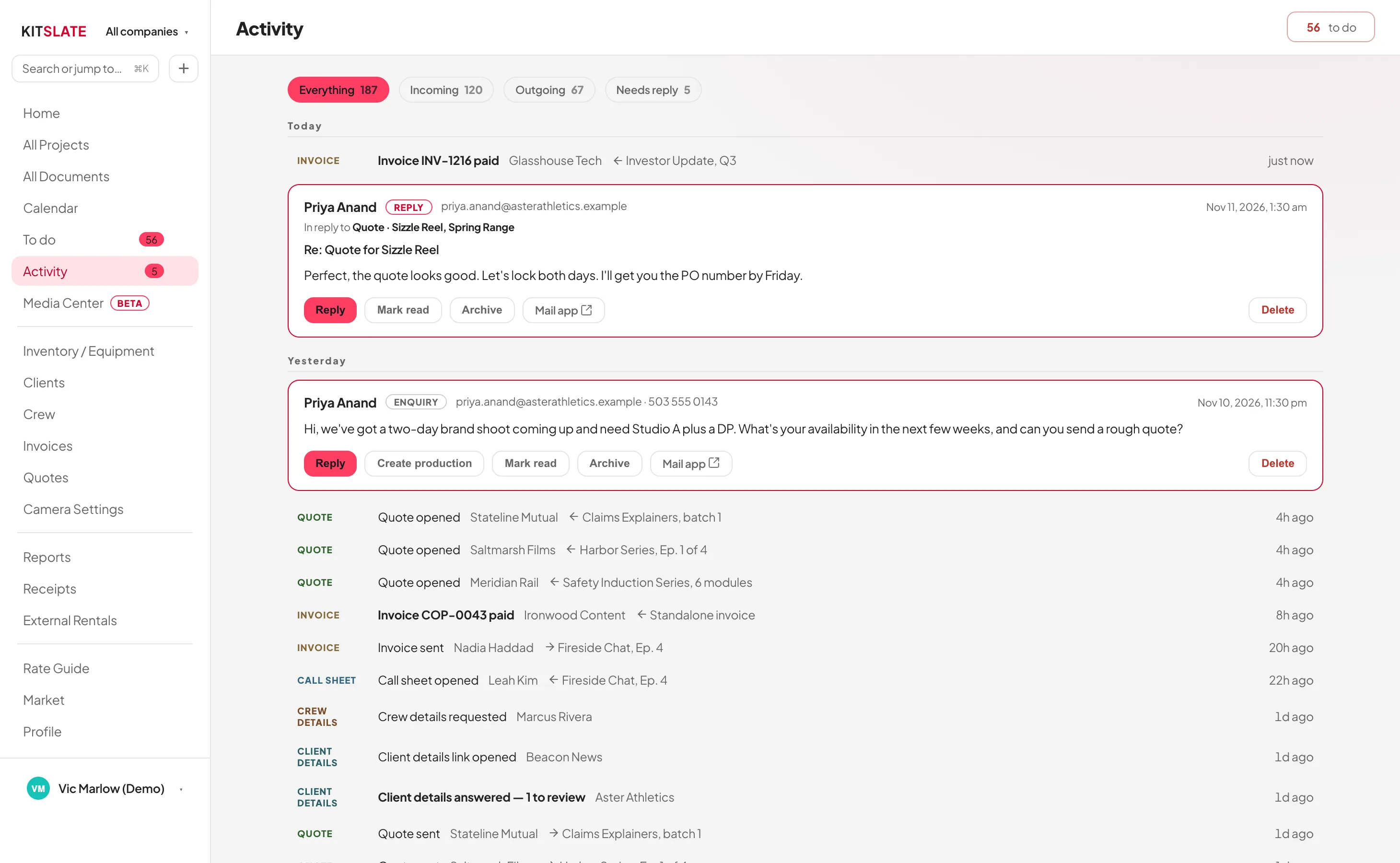
The Activity feed. Enquiries and replies alongside every document sent, filterable to everything, incoming, outgoing or needs reply, with per-recipient opened and confirmed status
Filter to incoming, outgoing or needs reply. And reply without leaving KitSlate
RECEIPTS FROM THE DAY . Their phone, your approval

The crew photograph their receipts. You approve them from your desk.

Give anyone on the job a receipt link.

THEIR PHONE. THE RECEIPT LINK
Receipts · Fireside ChatCopperline (Demo) asked for your receipts
Take a photoChoose a fileSend
IMG_4412.jpeg
DateJun 29
CategoryCatering & craft
Amount$44.53
Whose moneyMine
Send 2 receipts
WHAT YOU HAVE SENT
Jun 29 · 2 receipts$81.98 · your own
Jun 28 · 2 receipts$92.42 · company card
Sent2 receipts · $81.98 · your own money
POKE BOWL - 7TH AVENUE
333 7TH AVE
NEW YORK, NY
29-Jun-2026 1:11P
2 Plenty Bowl$32.90
2 Teas$8.00
Subtotal$40.90
Sales Tax 8.875%$3.63
Total$44.53
YOUR DESK. THE JOB’S EXPENSES TAB
kitslate.app/app · Fireside Chat, Ep. 4 · Expenses
Receipts sent in · Marcus Rivera2 receipts · $81.98 · their own money
Check
Spend by category
CategoryApprovedAwaiting checkTotal
Catering & craft $72.30$72.30$154.28 . $81.98. $72.30$154.28$154.28
Travel & transport$100.32. $100.32
Vehicle & fuel$30.00. $30.00
2 receipts from Marcus Rivera
06/29 · Catering & craftPoke Bowl. 2 plenty bowls, 2 teas
$44.53
06/29 · Catering & craftEAT & GO. Wraps and juice, JFK
$37.45
Add 2 expenses
POKE BOWL - 7TH AVENUE
333 7TH AVE
NEW YORK, NY
29-Jun-2026 1:11P
2 Plenty Bowl$32.90
2 Teas$8.00
Subtotal$40.90
Sales Tax 8.875%$3.63
Total$44.53
2 expenses added
OR DROP THE STACK ON YOUR DESK
kitslate.app/app · Expenses · Import receipts
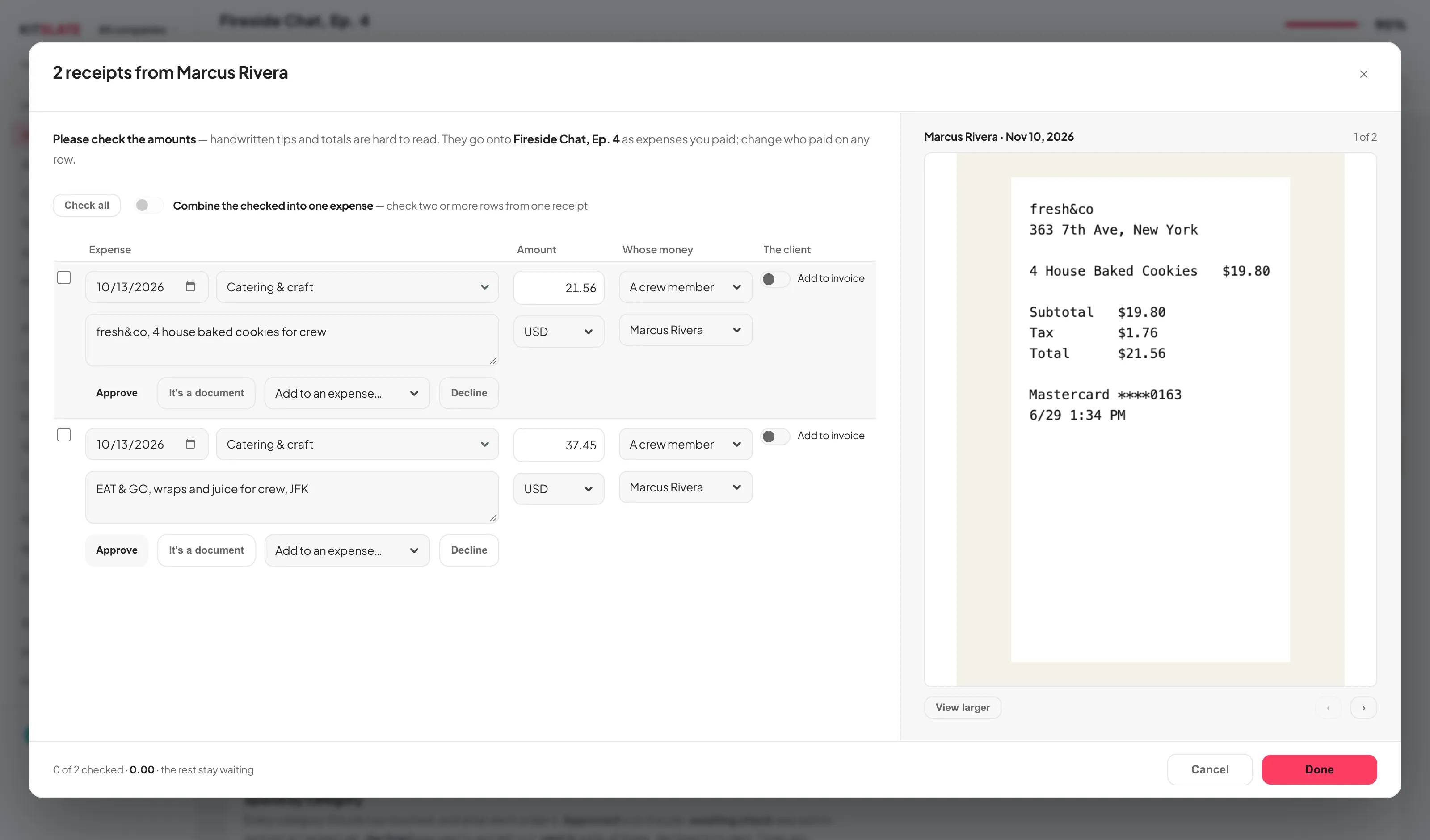
The receipt check: the expense rows on the left, the selected receipt fitted on the right with View larger, the sender named in the title
The same check for a stack you drop yourself. PDFs and photos together, read into rows, each beside its receipt
A WRONG PRICE, FIXED ON THEIR PHONE
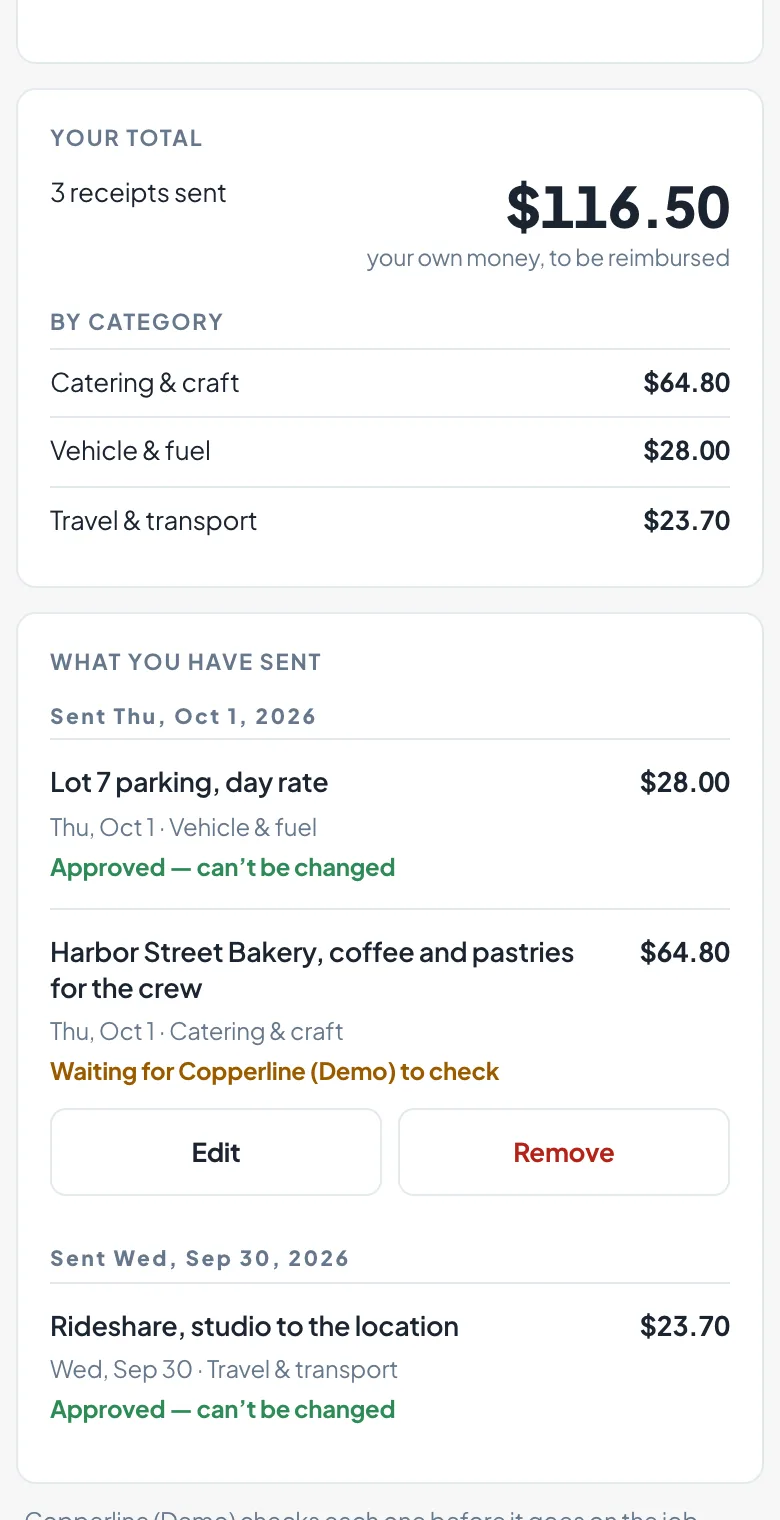
WHAT THEY HAVE SENT
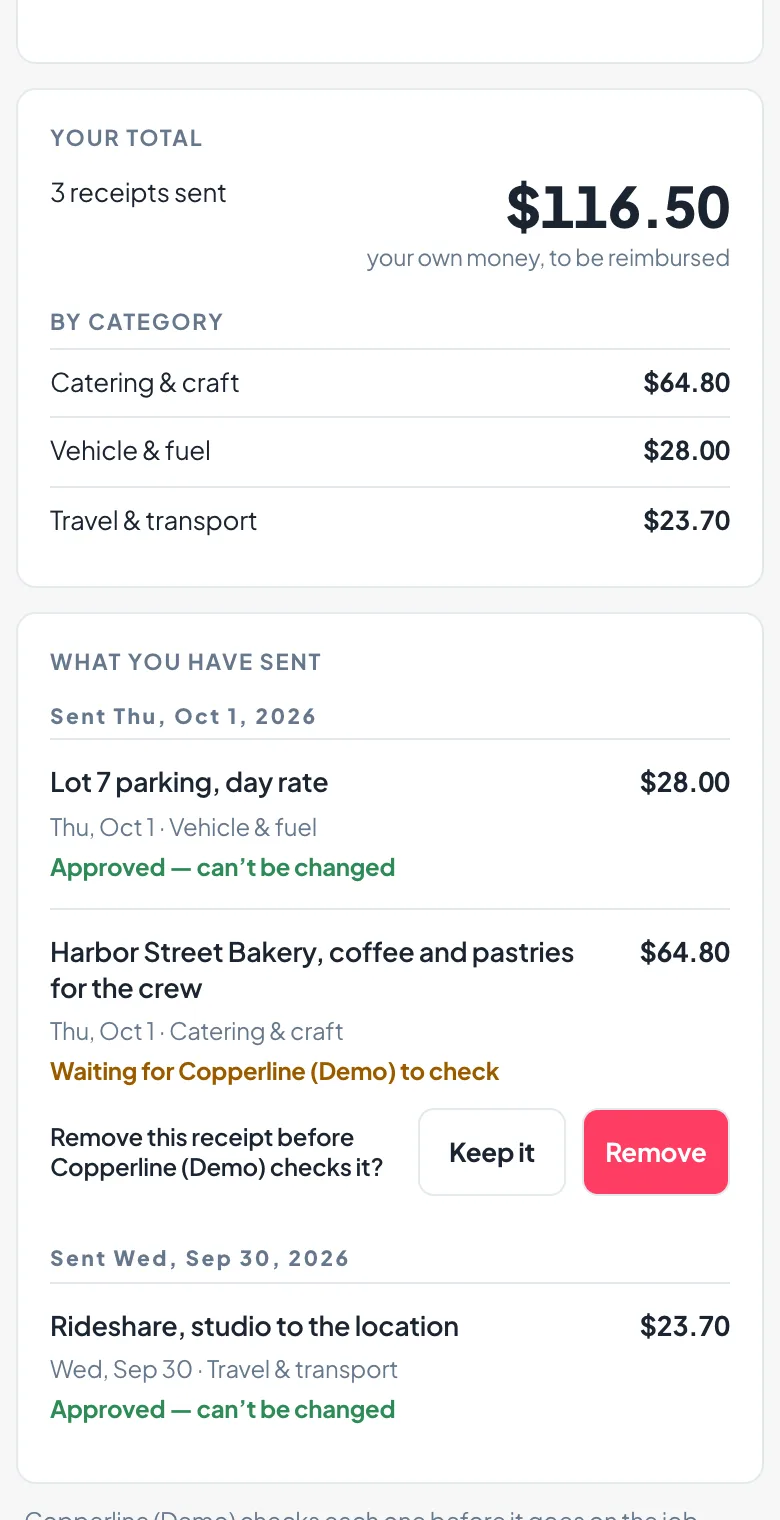
The receipts page on a phone: What you have sent, two receipts reading Approved. Can't be changed and one still waiting, with Edit and Remove buttons under it
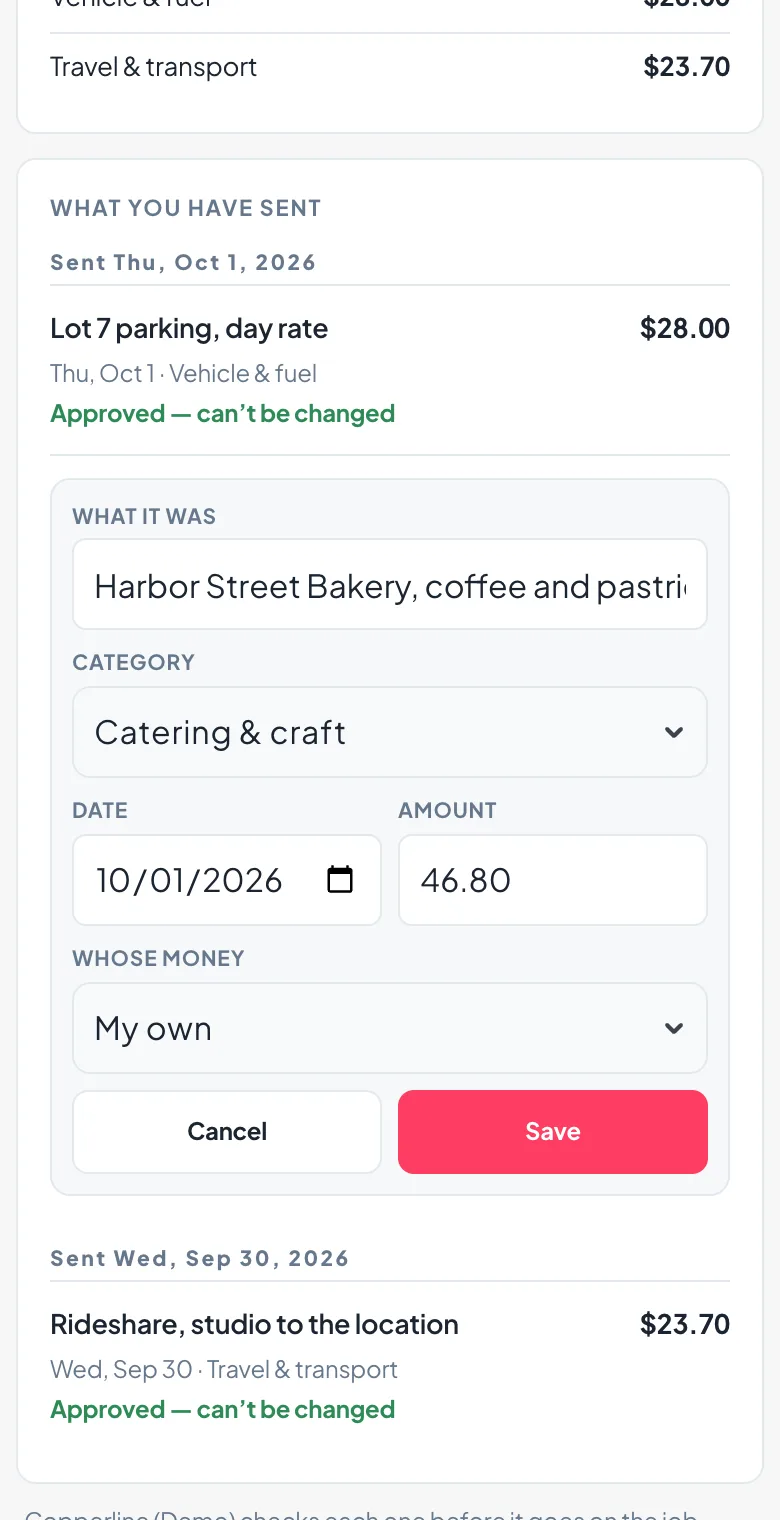
EDIT
The waiting receipt open for editing: what it was, the category, the date, the amount corrected, whose money, and Cancel and Save
REMOVE
Remove this receipt? asked on the page, with Keep it and Remove side by side
Until you check it, a receipt they sent keeps Edit and Remove; once you approve it, it is locked
THE RUSHES GO OUT . Up to 1 TB, by email or link

Send the day’s files to the client from the same place.

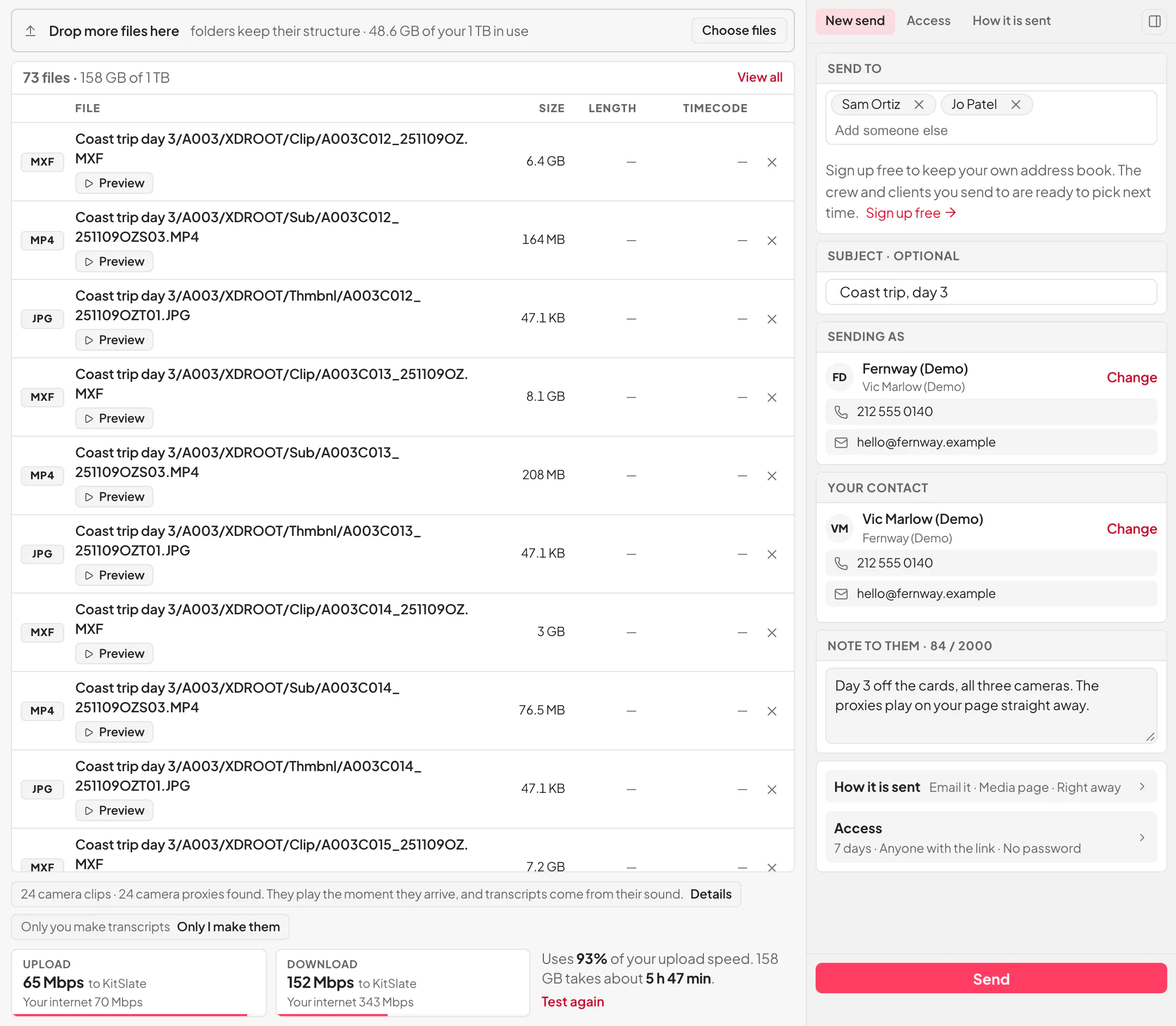
Drop the folder on the Send page. 5 GB per transfer on the free profile, 500 GB on Solo, 1 TB on Studio and above. And KitSlate emails each person their own link or hands you one to share.
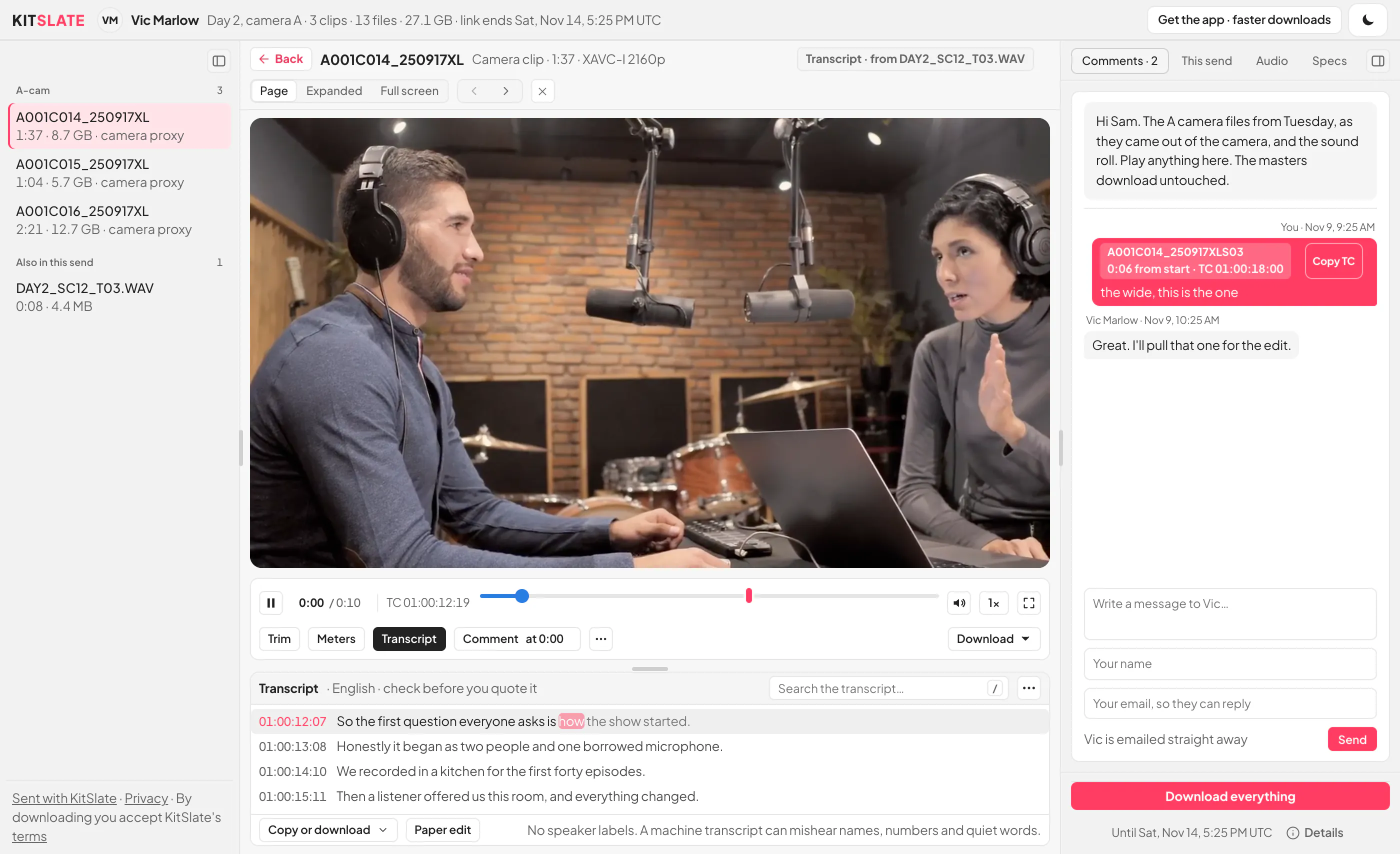
YOUR SIDE. THE SEND PAGE
kitslate.app/app · Media Center
The Send page: a drop zone, the transfer’s name and a speed test on the left; Email it or Get a link, who it goes to, who it is from, a note and the Send button on the right
Files and a speed test on the left, who gets it on the right. Nothing to scroll
THEIR SIDE. THE DOWNLOAD PAGE
kitslate.app/t/…
The download page as a window: the clips down the left, a camera clip playing from its proxy in the middle with its bar and the transcript under it, and at the right the comments with a note pinned to a timecode, then Download everything
Plays in the browser; Comment at pins a note to the paused frame; replies reach your inbox and the Sent tab
AND THEN THE NEXT ONE

Finish one production. Start the next further along.

The first job you set up in KitSlate takes the longest, because it is where the inventory, the crew and the clients get entered.

Duplicate the production

Copy a job that went well. The crew, the schedule and the pricing come with it.

Kits and presets

Bundle gear that always travels together into a kit and add it in one pick.

People stay entered

Crew, clients and their contact details, rates and roles live in their own databases.

New: ask Claude

Add KitSlate in Claude and ask who opened the rushes or what is overdue.

Rates carry

Day rates sit on the items and the people, so the next quote prices itself from the same numbers. And the Rate Guide shows where those numbers sit against the market.

AND WHEN THE ROOM IS DARK

Most of this work does not happen at a desk at noon.

So KitSlate has a Night mode with a depth to it, one switch in the top bar. And one thing it leaves alone.

  1. IT IS 1AM

    A white screen in a dark room.

    An edit bay with the lights down.
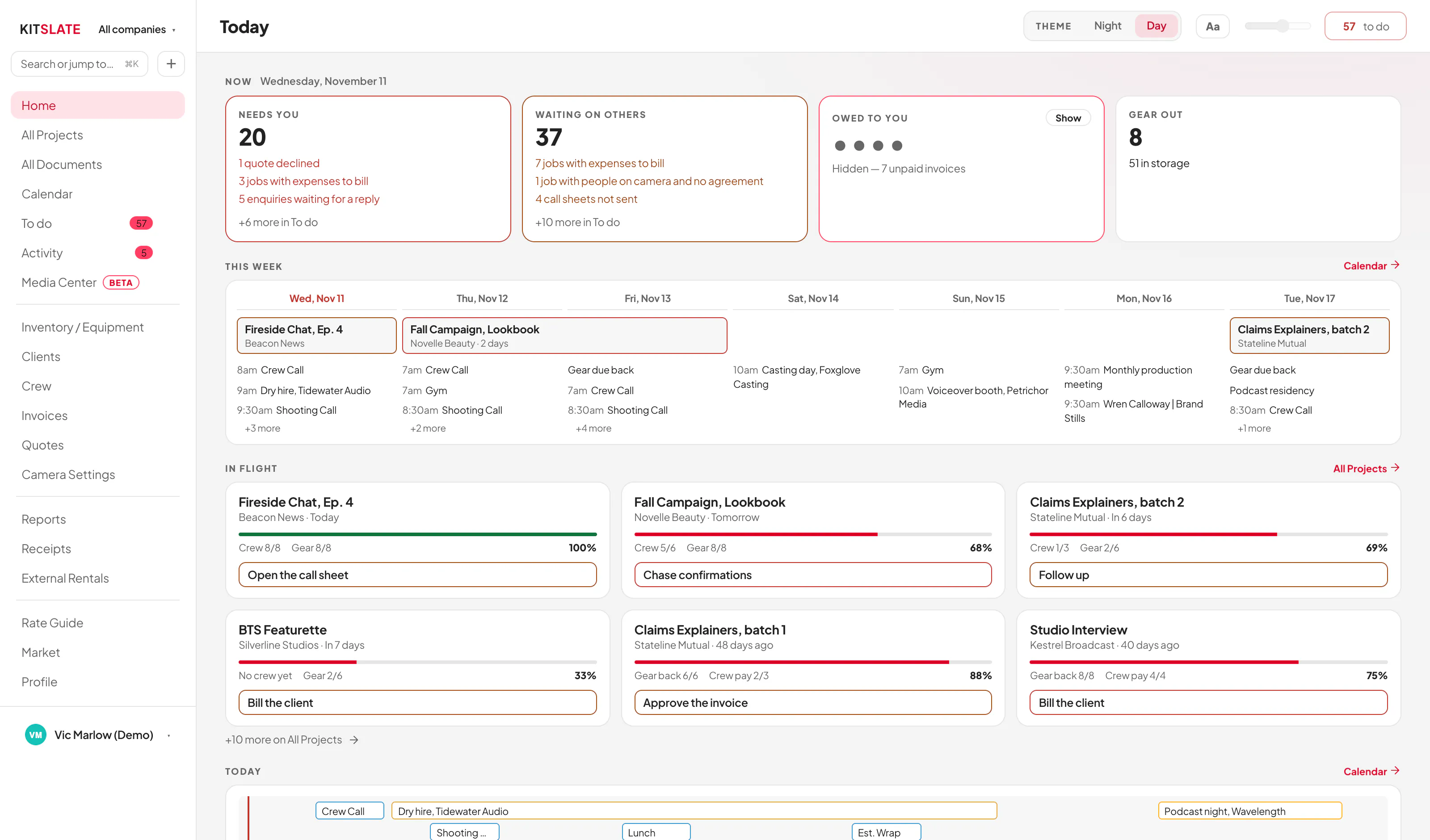
    The Home dashboard in Day. A light workspace, with the THEME switch in the top bar set to Day
    ↔ drag the picture sideways to read it
  2. FLICK IT

    One tap, and how far down is a slider.

    THEME · Night · Day sits in the top bar on Home and again in Settings. The same control in both places, never two that drift apart.

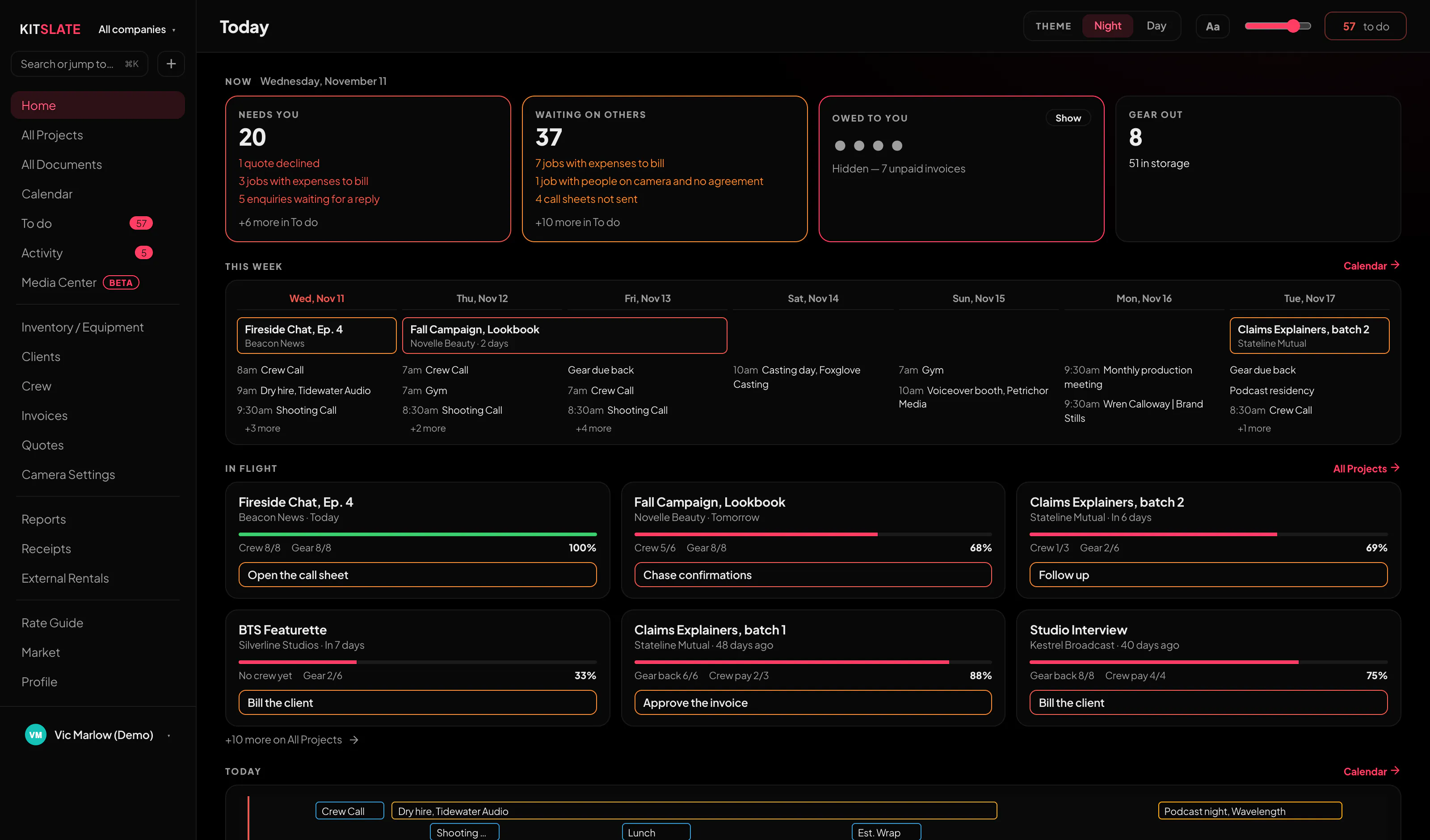
    The workspace top bar at Night. THEME with Night lit, the Aa high-contrast button, and the depth slider at 100
    The bar itself, at Night, with the depth at 100. Aa beside it pushes text to pure white at Night and pure black in Day.
    The same Home dashboard at Night with the depth at 100. Every surface pitch black
    ↔ drag the picture sideways to read it
  3. AND WHAT DOES NOT MOVE

    The tool goes dark. The document does not.

    The call sheet, the quote, the gear list and the invoice stay on white paper at every depth.
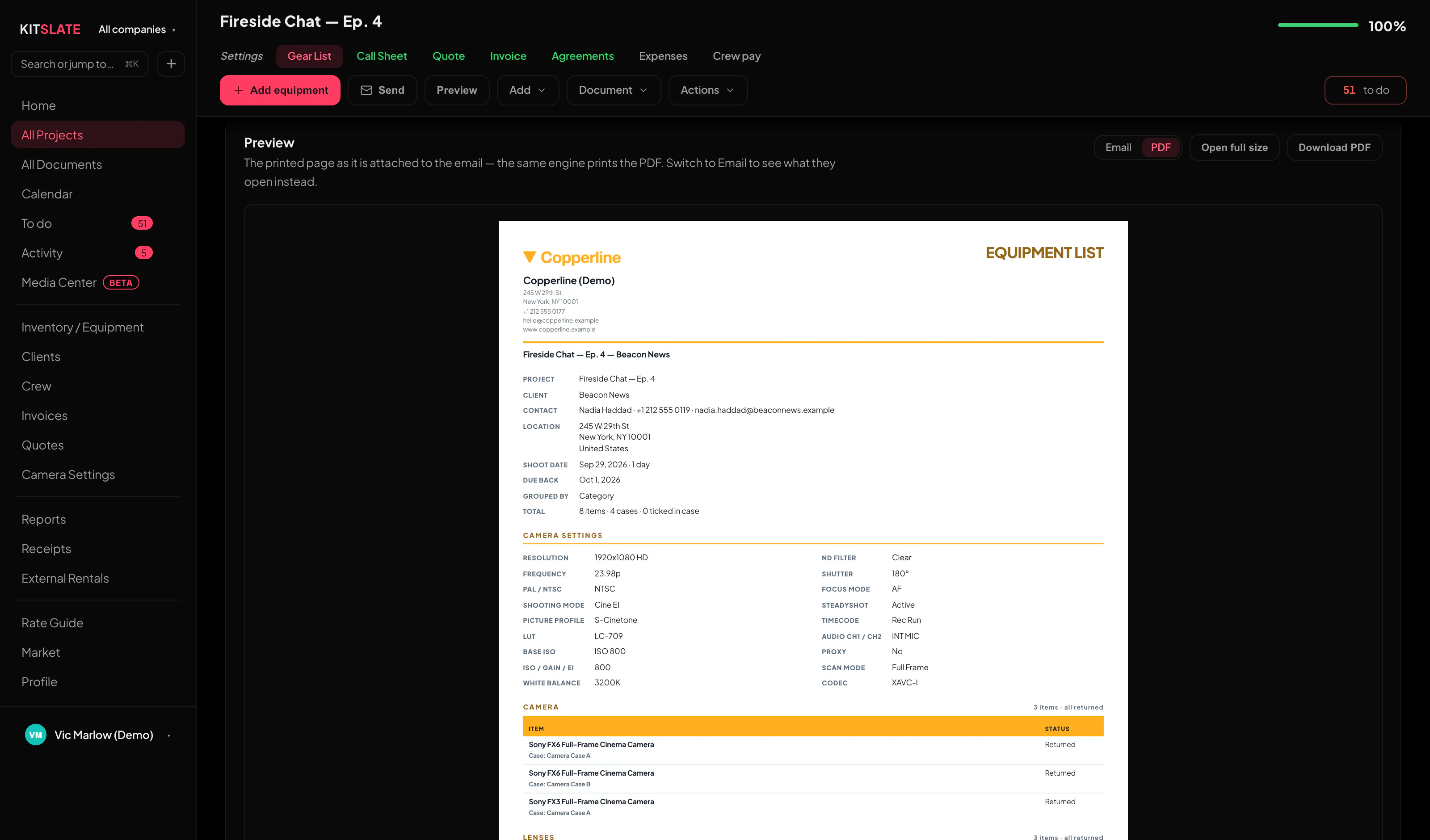
    A production's gear list at Night. The workspace around it black, the document itself still on white paper
    ↔ drag the picture sideways to read it
The Home dashboard in Day. A light workspace, with the THEME switch in the top bar set to Day The same Home dashboard at Night with the depth at 100. Every surface pitch black A production's gear list at Night. The workspace around it black, the document itself still on white paper
Day · the default, and where most people stay

And Day is the same tap back. The setting is stored with your workspace, so the next machine you sign in on opens the way you left it. And this page has the same switch in its own top bar, if you would rather see it happen here than read about it.

The same top bar in Day. Day lit, and no depth slider, because in Day there is nothing for it to do

Coming over from the spreadsheet?

Keep your kit in Gear List for Video Professionals? It crosses in one CSV.
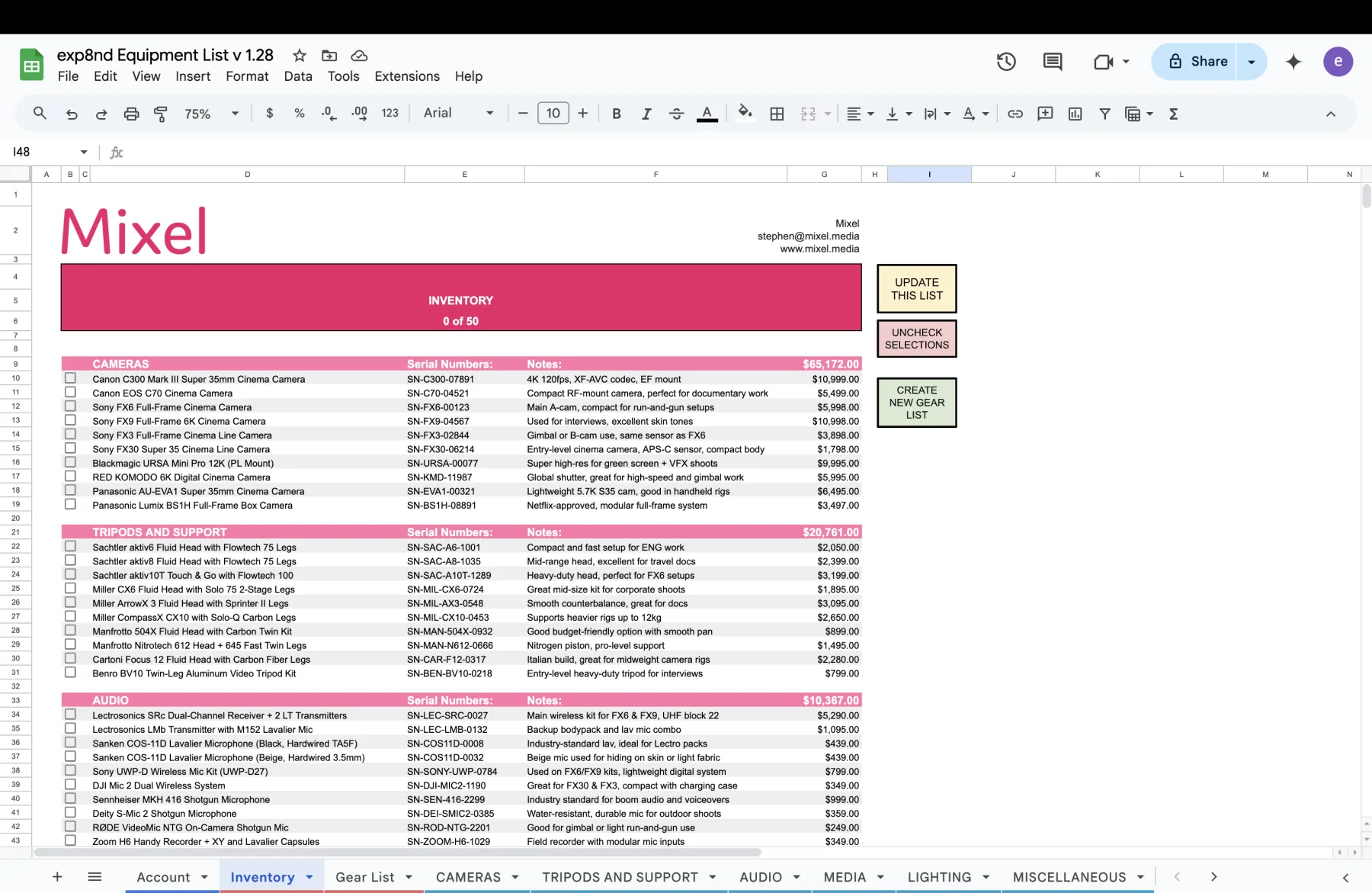
docs.google.com · Inventory
The spreadsheet Inventory tab: pink category header bands for CAMERAS, TRIPODS AND SUPPORT and AUDIO, each row a checkbox, item name, serial number, note and price.
Your Inventory tab. One export covers every category
docs.google.com · New Shoot
A saved shoot tab in the spreadsheet with camera settings across the top and every item colour-coded by its packed, returned, missing or broken checkbox.
Packing and returns become buttons on the job
THE MOVE. ABOUT TWO MINUTES

Three steps, and your kit is in.

1 · ExportOpen your Inventory tab, hit UPDATE THIS LIST, then File → Download → Comma-separated values (.csv). Google exports whichever tab is in front. 2 · ImportIn KitSlate open Inventory, then Import / Export → Import… and drop the file in. Several files at once is fine. 3 · Check, then commitYour pink category bands are read as real categories. The preview says how many are new, how many already exist and which categories it will create. Nothing is written until you press the button. Import it twiceAnything with the same name and serial is flagged EXISTS and skipped, so re-importing after you add more gear only brings in the new rows. No sheet to handPaste a plain list, upload a PDF equipment list, or photograph a purchase receipt. The same import door takes all three, with AI standing by for anything the standard reader can’t shape. Receipt import is on every paid plan.
Full import instructions →

See it move.

A full workspace. No account, nothing to install.

← Back to the overview  ·  See pricing