Features · Calendar & availability

A calendar that understands productions.

Bookings draw across every day they occupy, coloured by company. Drafts hold space without blocking the date. Connect the calendars your bookings already land in to see what is really free — and publish yours back out to Google, Apple or Outlook.
app.kitslate.app · calendar
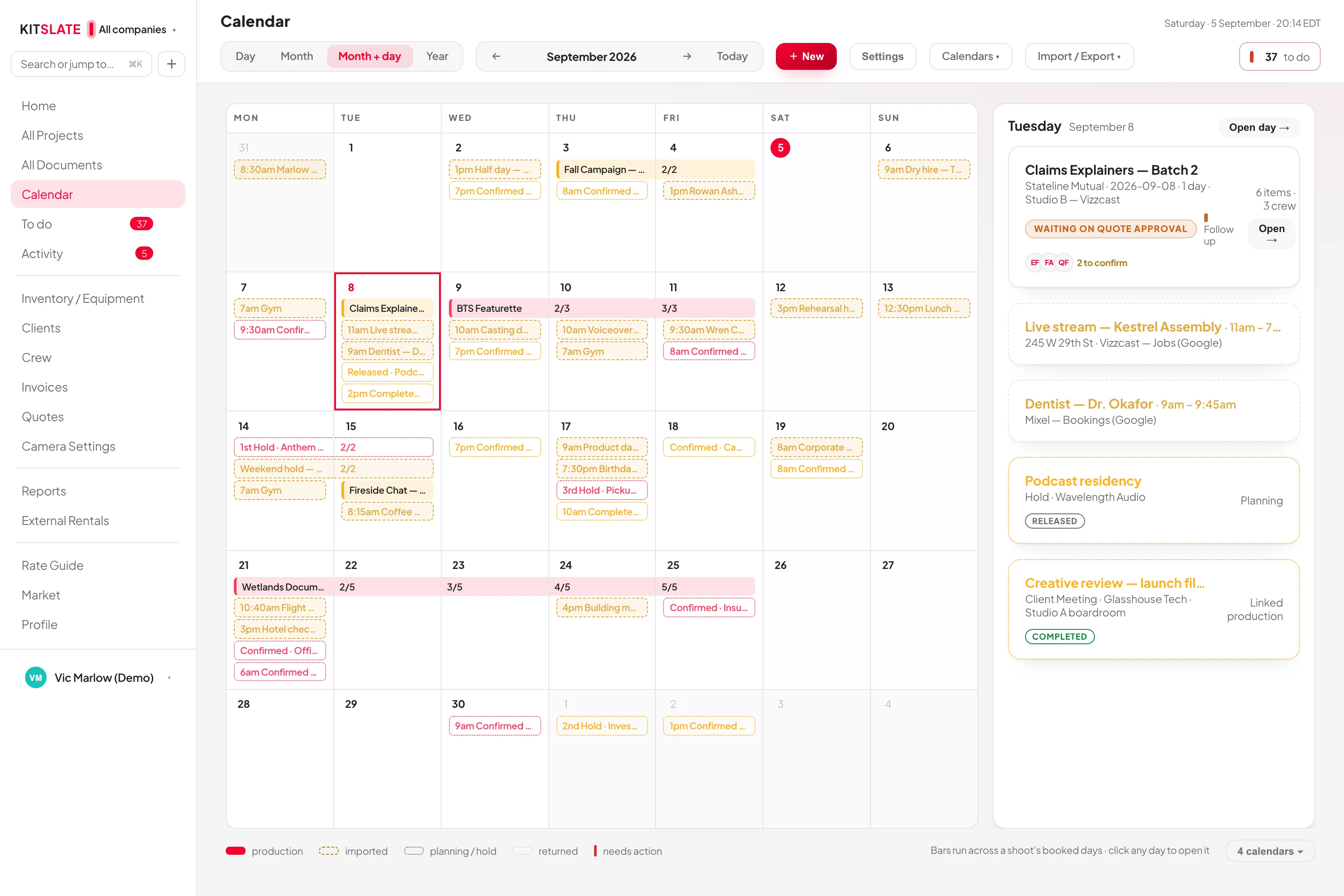
The KitSlate calendar in month view — bars running across each production's booked days, coloured by company
Month view. Bars run across a shoot's booked days; day two onwards carries its position in the run.
01 · SEE — day, month, month + day, year

A run reads as a run.

A booking that runs more than one day says so on every day it occupies: the name on the day it starts, then 2/5, 3/5 on each following day — so a Thursday in the middle tells you which run it is and how far through.

Click a dayA card opens over the month with every booking on it — client, location, crew, state — and a booking inside it opens in place: call times, crew, quote and payment, with a way to the project.
Drafts and returnsA draft shoot is a dashed outline with a DRAFT badge; it reserves planning space without blocking the date. A returned job draws outlined instead of filled.
Planning eventsHold, pencil booking, client meeting, scout, travel day, equipment service — each with its own status, from Inquiry through 1st, 2nd and 3rd Hold to Confirmed, and its own availability. Create production builds the job from the event.
The yearSix months to a row, and beneath the grid: the year, density by month, clients and companies, crew.
02 · CONNECT — outside calendars in

Bring in the calendar your bookings already land in.

Google Calendar, Apple iCloud, Outlook / Microsoft 365, any iCal address, or a one-time .ics upload. Bookings from a website or a marketplace arrive the same way: connect the calendar they land in and they come in with the next refresh.
What a calendar blocksNothing, by default — display only. Pick a room only when the calendar genuinely means somewhere is taken; then the day says client in the studio and names the room.
Studio availabilityPick a day and see which spaces are free and exactly what is holding the rest, across productions, imported bookings and planning events at once.
Time zonesEvery calendar carries its own time zone and every event is pinned to a real instant. A studio in Melbourne and one in New York share the same screen.
It fails closedA connection that has not synced in a day reads STALE, and any room it maps to reads availability uncertain rather than free.
app.kitslate.app · calendar · day
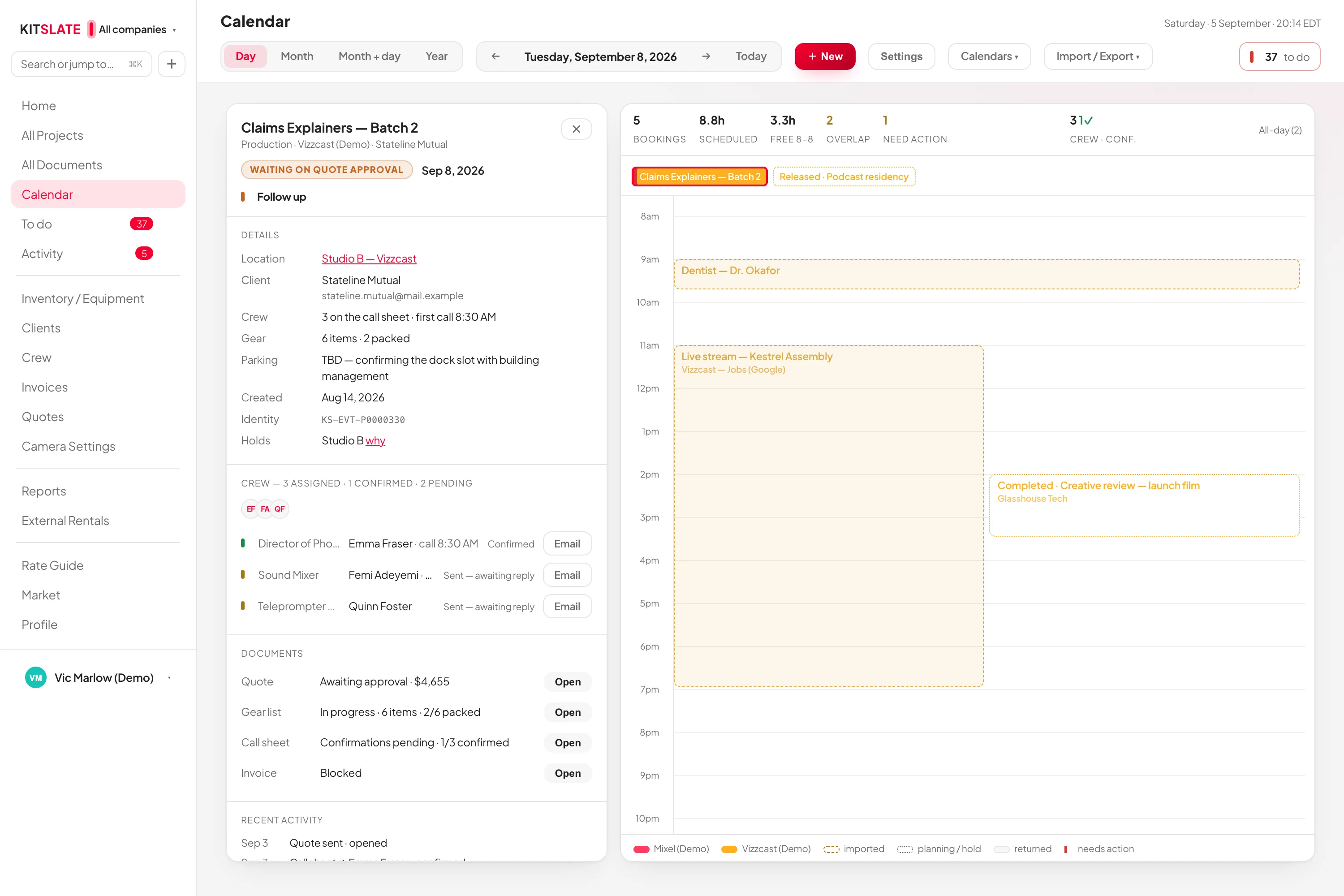
The calendar's day view — the day's productions with call times, crew and rooms, side by side with the month
Day view: who is on set, in which room, and what is holding the rest.
03 · PUBLISH — your calendar out

And send yours out.

A private subscription link per company that Google, Apple or Outlook read on their own schedule — or connect Google Calendar and every save writes to it within moments.

Choose what subscribers seeKey dates, gear due-back, drafts, invoice due dates (never amounts), locations, client names — each a switch.
Google, liveA new booking, a moved date or a cancelled job appears in Google on its own. KitSlate writes only to the calendar you chose and touches only the events it created.
Regenerate kills the old linkAnyone with the link can read that company's calendar, so it is treated like a password: regenerate it and the old address stops instantly.
Drafts stay privateA draft shoot never enters the published feed.
QUESTIONS — the ones people ask first

Before you try it.

Is calendar sync two-way?

Each direction is one-way. Connected calendars are read-only in KitSlate; edit the event where it came from and the change flows back on refresh. The Google connection writes KitSlate's bookings out and never reads yours back.

Does it stop me double-booking?

Conflict detection covers equipment and studio rooms across every booking. Crew are not conflict-checked; the Today page tells you when you are in two places.

What happens on a phone?

The calendar opens on the Day view — today, the timeline, and who is on set. The month grid keeps its colours and spans, and tapping a day opens that day.

Can a hold become a job?

Yes. A planning event links to a real production rather than copying it: Create production builds one prefilled from the event, and its panel then shows the quote, call sheet, gear and invoice state.

See a month of real bookings.

The sandbox calendar has productions, drafts and a planning hold already on it. Click a day.

PREVIEW — NOT THE LIVE SITE · 2088 · 18 Sep 2026 · 1acea393