Features · Agreements & releases

Talent releases, location releases and NDAs, signed on a phone.

Write the wording once. Pull the signers off the call sheet. Send each person their own link, and file the countersigned copy automatically — with an audit trail of who saw what, when, on which device. Nothing to connect: signing is built in.
app.kitslate.app · agreements
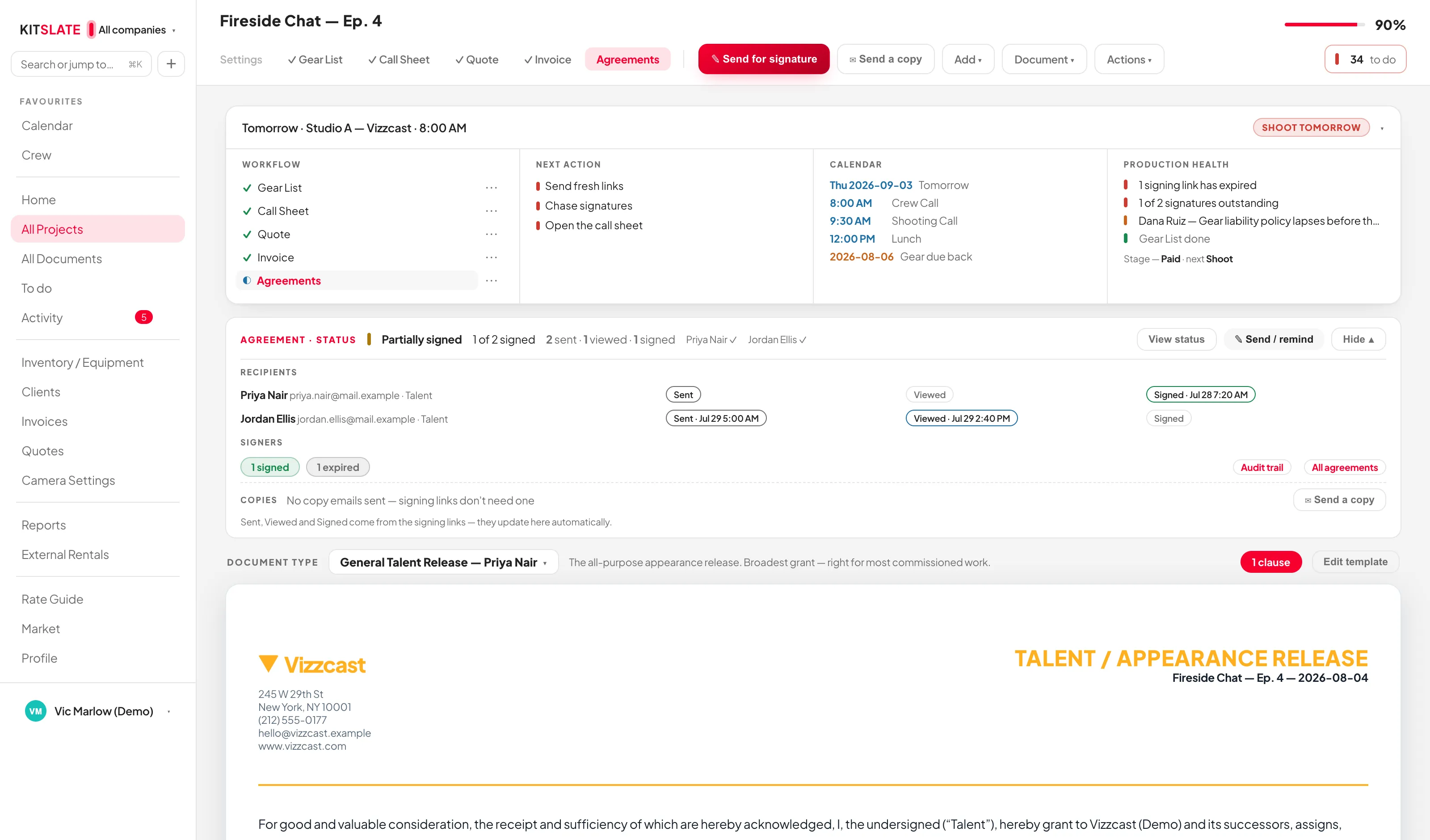
The KitSlate agreements tab — the signing status band across the top, the signers table with each person's own state, and the document beneath
The band at the top is the workflow — who has signed, who has only looked, and one button to chase the rest.
01 · WRITE — three types, one engine

Wording once, in Settings. Every job picks it up.

General Talent Release ships with eight wordings — General Talent, Appearance, Documentary, Commercial, Interview, Podcast, Reality TV and Social Media. Location Release is signed by whoever controls the property. Other / Custom is yours: a crew NDA, a contractor letter, anything that needs signing.

Merge fields resolve per signer{{Talent Name}}, {{Shoot Date}}, {{Company}}, {{Property Address}} and the rest fill from the production, so one template serves a whole cast. An empty field prints as [Field Name], never as a raw token.
Saved clausesAI Usage, Social Media, Exclusivity, Territory, Time Limited Licence, Credit Requirement, Music Rights, NDA, Usage Restrictions, No Further Payment. Build them into a template or add one to a single agreement.
Deal terms fill themselvesHire fee from the approved quote, deposit at half, booking dates from the shoot, access times from the call sheet's first and last call. Each says where it came from, and typing over it wins.
A visual editorEach paragraph is a block with the real document rendering live beside it. Type / or {{ to insert a field or a clause. The AI assistant rewrites the body only, and one click undoes it.
02 · SIGN — their own link, their own phone

Nobody downloads anything. Nobody needs an account.

Send for signature uses the same sending box every document does. Everyone gets their own private link, opens it on a phone, reads the document in the page and signs with a finger.
Signers from the call sheetPull talent from the call sheet reconciles rather than duplicating: it matches on name and fills blank roles and emails from your crew database.
Who signs as whatTalent, Authorized Property Representative, Signer, Guardian, Witness, Producer or Client. A minor's release is not complete until the guardian has signed too.
Reminders that stop themselvesAfter 3, 5, 7 or your own number of days, and they stop the moment somebody signs. A signer can decline, with a reason, and that comes back as well.
Sign here, on this deviceDraw it or type it, for someone standing next to you. The countersigned PDF is emailed to them either way.
kitslate.app/fill · signing
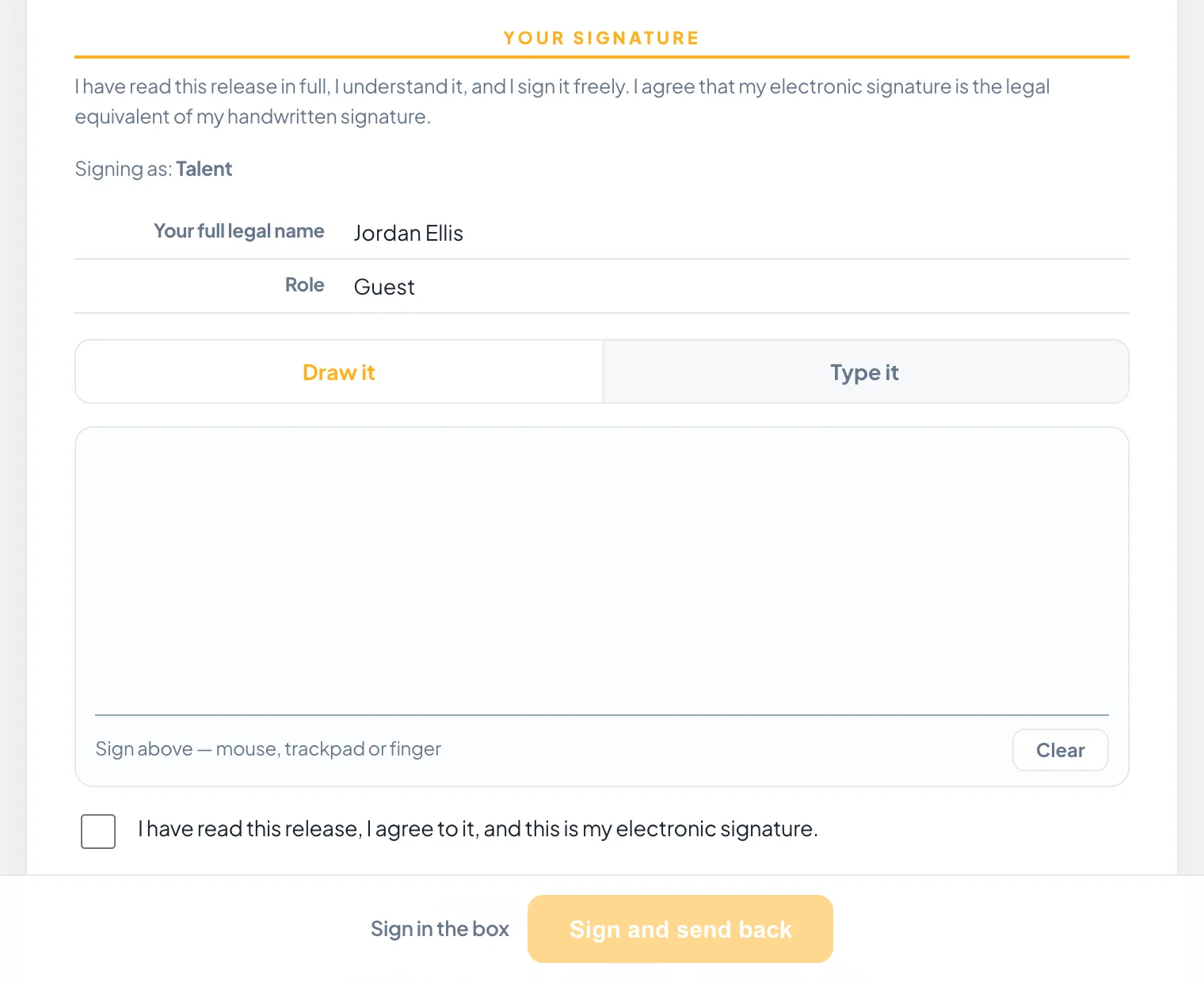
The signing page on a phone — the agreement in the page, the signer's name, and the box they sign in with a finger
What the signer sees: the document, who they are signing as, and a box to sign in.
03 · KEEP — what they signed is what is kept

The record does not move.

Change a template and every agreement still in draft regenerates. Anyone who has already signed keeps the exact wording they agreed to — their copy, and every copy regenerated afterwards, reproduces the text they actually saw.

Signed rows lockThe moment someone signs, their name, role, email and signature date become read-only. An attempt to change one is refused and recorded in the audit trail, naming the field.
The audit trailCreated, edited, type changed, sent, viewed, reminder sent, signed, declined, downloaded, delivered, completed — each with a timestamp, each signature with IP address, device and browser. It exports as CSV.
Every agreement, everywhereOne dashboard across every production: total signed, a filter per state, one searchable table of every signer. Production Health flags an unsigned release, a declined one, an expired link, a minor missing a guardian.
The printed copyDocument id, version, generation timestamp, page numbers and a QR back to the record. The signature block names the role that signed it.
QUESTIONS — the ones people ask first

Before you try it.

Do I need DocuSign or another signing service?

No. KitSlate's own signing engine is built in and needs nothing connected. The agreement, the templates and the audit trail are all in one place.

Can one production carry several agreements?

Yes — a talent release for the cast and a location release for the venue on the same job, each its own document with its own signers, status and audit trail.

What does the signer receive afterwards?

The page turns into their receipt with the complete agreement as signed, and a countersigned copy is emailed to them at the same time.

Can I edit a template after people have signed?

Yes. Drafts regenerate from the new wording. Signed copies keep the text that was signed, and the PDF says so if an older signature's text could not be preserved.

Send one to yourself.

The sandbox has a talent release ready to go. Send it to your own address and sign it on your phone.

PREVIEW — NOT THE LIVE SITE · 2088 · 18 Sep 2026 · 1acea393