Features · Productions

Production management software built around one record per job.

Each job is one record that its gear list, call sheet, quote, invoice and releases all read from. The board shows blocked jobs first.
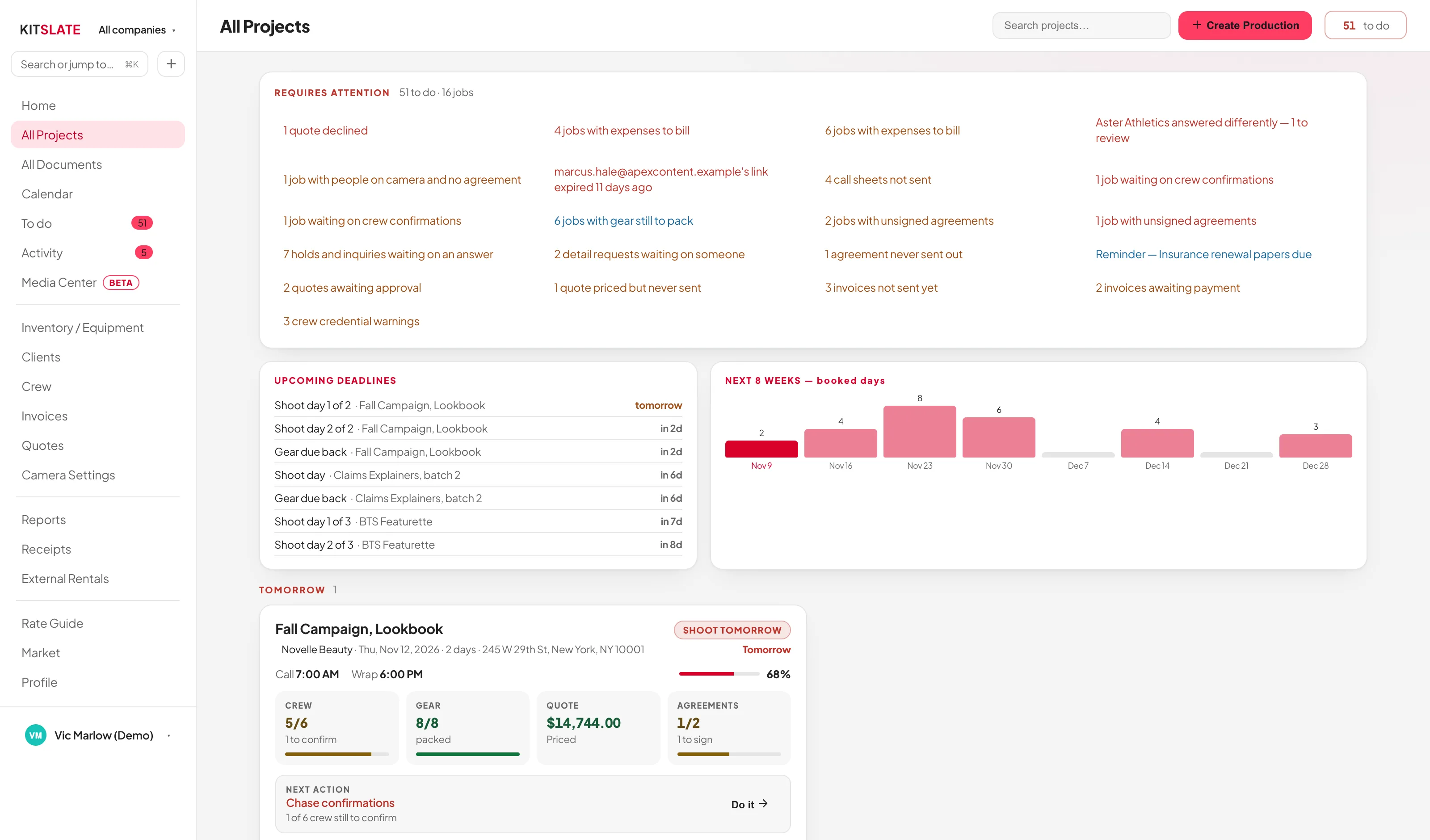
kitslate.app/app · projects
The All Projects board: what requires attention across the top, upcoming deadlines and booked days, then job cards in date buckets, each with a completion bar, crew, gear, quote and agreement tiles, the next action and a chip for every document
Attention first, then everything else in the order it comes up.
01 · ATTENTION — what is blocked, first

Blockers first, then the schedule.

Every blocker across every job, one line each: 2 invoices overdue, 3 call sheets not sent.

Each row is a filterClick a line and the board narrows to those jobs.
Ordered by how much it should worry youOverdue invoices and declined quotes first, undated jobs last.
Always presentWith nothing blocked it reads Nothing is blocked — every job is on track, and the layout stays put.
Deadlines and workloadDeadlines in order, and booked days per week for the next eight weeks.
02 · READ — one card, five tracks

The state of every job, on one card.

Jobs sit in date buckets, from shooting today to archived. Empty buckets are hidden.
Four tiles for the stageBefore the shoot: crew, gear, quote, agreements. After: invoice, gear back, expenses, crew pay.
Next action, done from the cardThe next step, with a Do it → button that does it from the board.
Document chipsEvery document’s state on a chip, struck through when not required.
The numbersQuote total, items, crew and agreements signed, without opening the job.
Dates the way you read themEach job follows your date order or its own, on every document.
kitslate.app/app · production
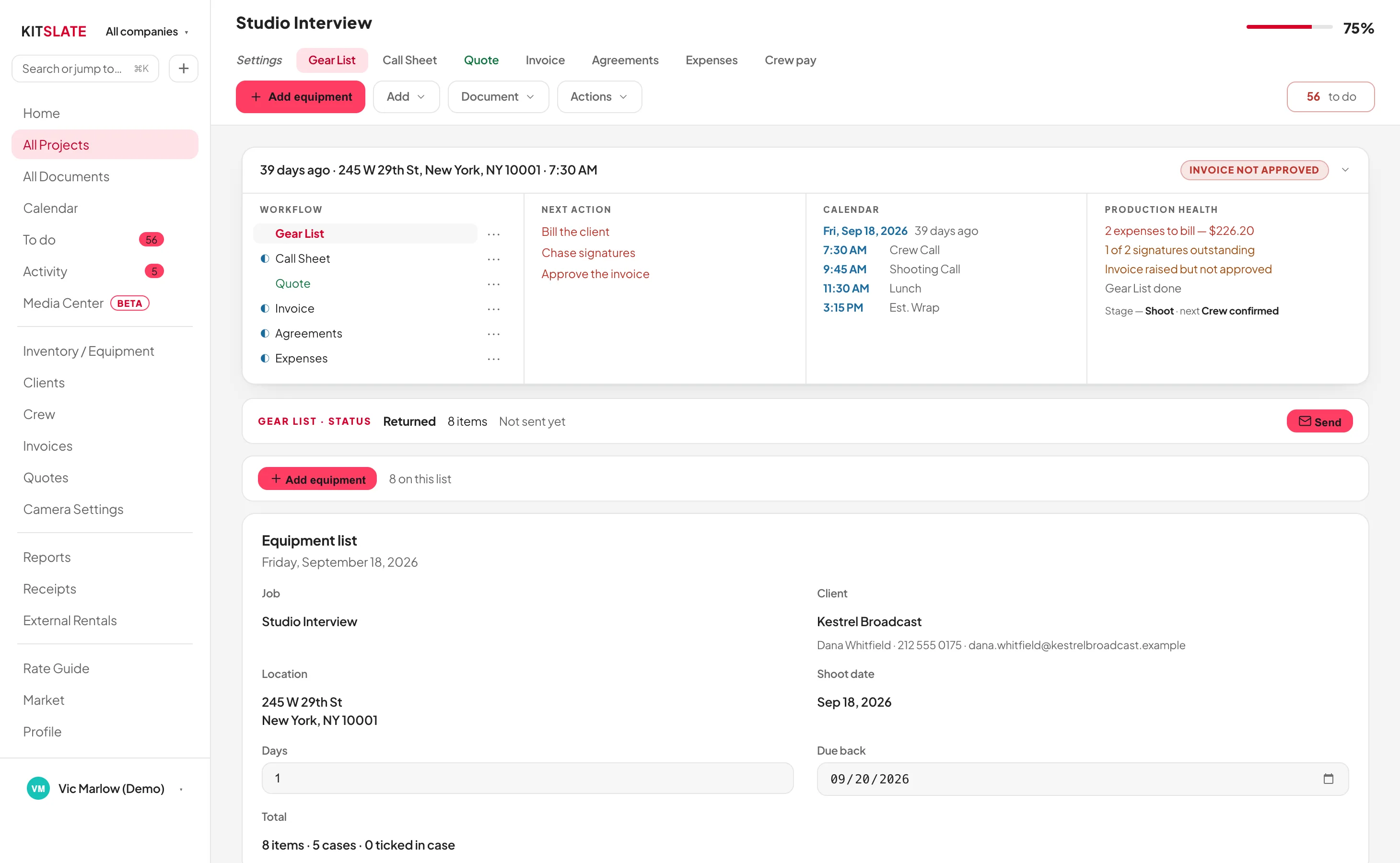
A single production open, showing its tabs and the documents raised against it
One job, with every document it has raised.
03 · CARRY — entered once

Entered once, used everywhere.

The job’s dates are the call sheet’s, the gear booking’s and the quote’s. Change them once.

The quote knows the gearItems come off the gear list at your rates, and the invoice comes from the quote.
The call sheet knows the crewEveryone on the quote moves to the call sheet in one click.
The releases know the talentThe call sheet’s talent feeds the agreement.
One item, one job at a timeBefore a booking saves, its gear, kits and crew are checked against every other job on those dates.
QUESTIONS — the ones people ask first

Before you try it.

Where does a job start?

From a quote, a calendar event, a booking, another call sheet or an outside invoice.

Do I have to use all five documents?

No. Mark one not required and the completion bar stops counting it.

What happens to a job when it is finished?

It moves to wrapping up, then completed. Archived jobs stay searchable.

Can I work under more than one company?

Yes, two on Studio and above. Each has its own branding, numbering and currency.

Open a job that already exists.

The sandbox has jobs at every stage. Nothing to install.

PREVIEW — NOT THE LIVE SITE · 5278 · 17 Nov 2026 · 28118909