Features · Equipment inventory

An inventory that prices your quotes and packs your van.

Every camera, lens, light and cable in one place, with three day rates that cascade, cases that know what is in them, and an importer that reads a spreadsheet, a PDF, a photo of a list or a pile of receipts. This is the screen the rest of the app leans on hardest.
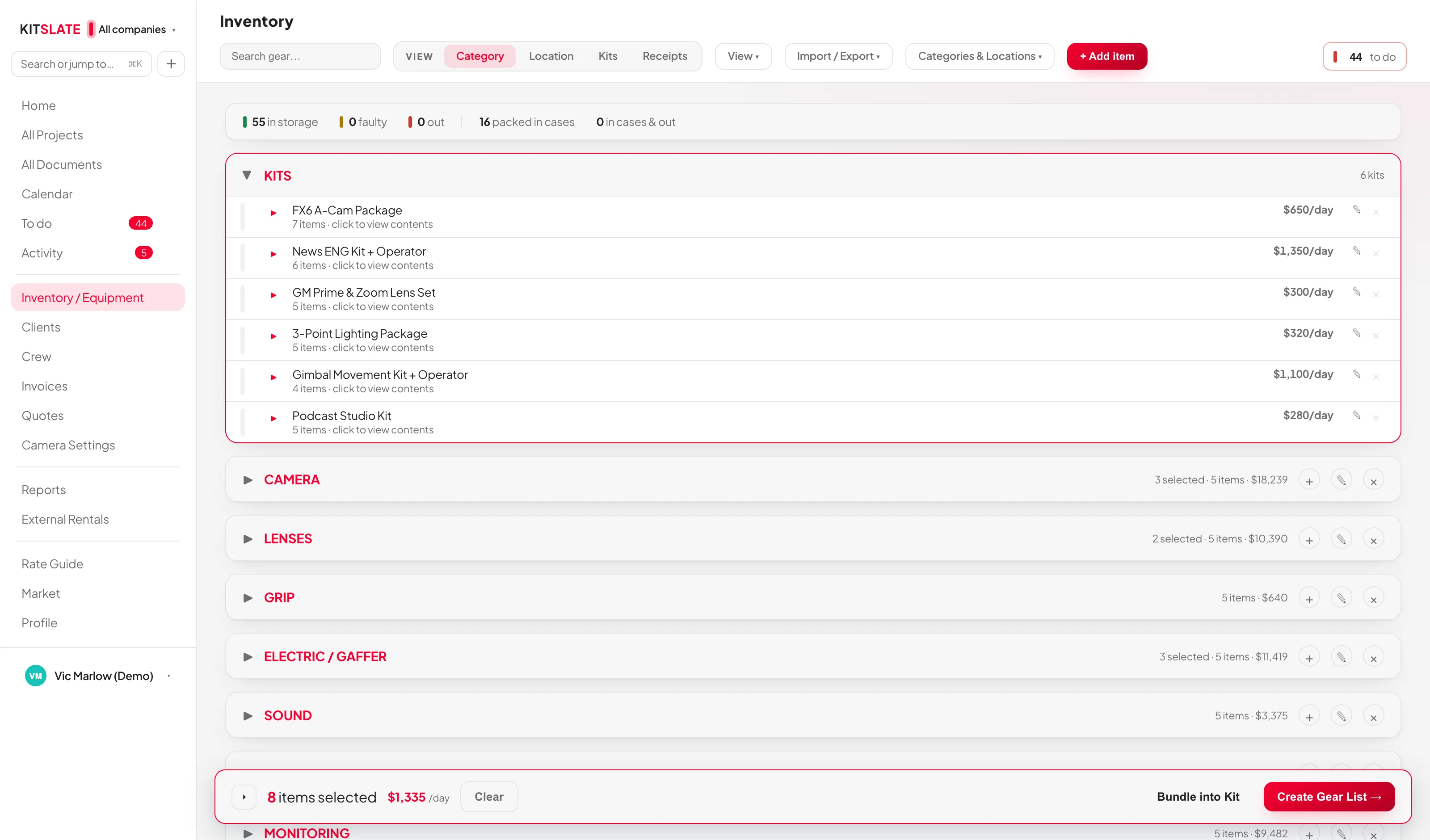
app.kitslate.app · inventory
The KitSlate inventory — kits at the top, then categories of equipment, each row with its rates and a status bar
Kits at the top, then your categories. The thin bar at the right of each row is its status.
01 · ORGANISE — categories, locations, kits

Three ways your gear is organised.

Categories are the top-level grouping and every item is in exactly one. Locations are where a thing physically sits. Kits are named bundles with one blended day rate.

Cases are locationsTick Is this a case? on an item and it becomes a location other items live in, listed with a CASE tag. Pack by case on the gear list follows from this.
Status in one clickThe bar at the right of every row cycles in → out → faulty. Gear lists set it for you when you mark things packed and returned.
Search everythingName, serial, model, location and category, with every section expanding as you type.
Columns you can maskSerial, rate, cost and replacement value each show, mask to dots for screen-sharing, or hide.
02 · PRICE — three day rates

Fill in only the rates that differ.

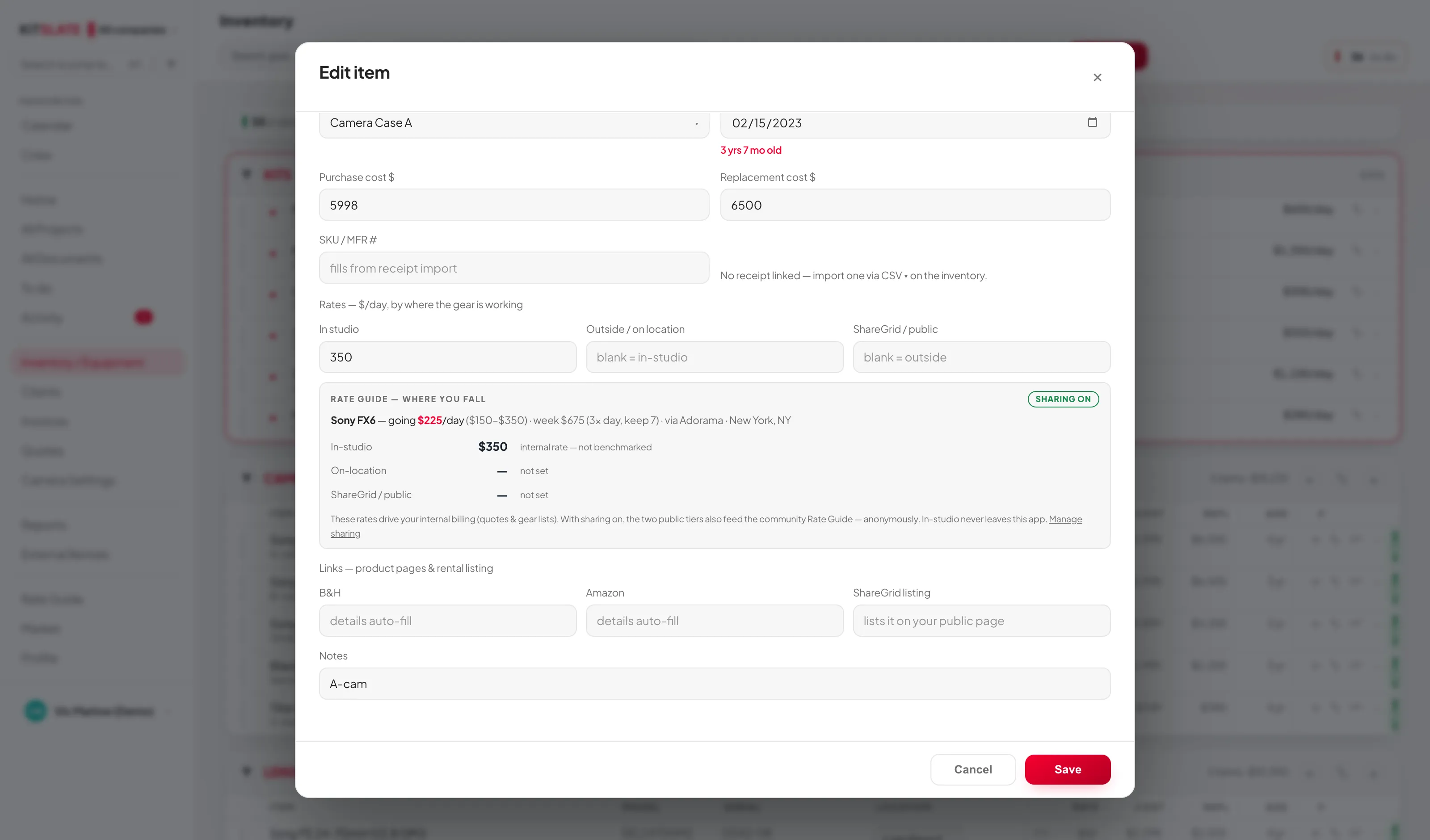
Each item carries In studio, Outside / on location and ShareGrid / public day rates. Leave one blank and it falls back down the chain, so a gear list at outside rates uses Outside, or In studio if there is none.
Market rate, inlineThe ≈ on a row opens the going day rate near you, the weekly price, and how your three tiers compare — when Rate Guide sharing is on.
Links auto-fillPaste a B&H or Amazon product URL and the name, model and price are fetched. Paste a ShareGrid listing URL and that alone publishes the item as kit for hire on your public page.
Merge duplicates⇄ moves the receipt, SKU and price paid across to another item and deletes this one, suggesting likely duplicates by serial, then SKU, then shared words.
No quantity field, on purposeMultiples are separate rows with their own serials. The importers expand qty: 3 into three rows for you.
app.kitslate.app · inventory · edit item
The item editor — model, serials, location, purchase details, and the three day-rate boxes: in studio, outside on location, ShareGrid public
The item editor. The three rate boxes are the important part.
03 · IMPORT — one door for anything that lists gear

Drop a spreadsheet, a PDF, a photo or a receipt.

Import equipment takes a CSV, a PDF, a photo, or pasted text. Files it recognises are read directly; anything else gets a Read it with AI → offer. Either way you land on the same review: tick what you want, untick misreads, add.

ReceiptsDrop the PDFs and each is reviewed one at a time: order number, date, buyer, totals. A line can update an existing item's price paid, date and SKU and link the receipt — it never renames or moves your item.
Tidy the namesImported names that nearly match the shared catalogue are offered for tidying, one tick each. That is what lines your gear up with the Rate Guide benchmarks.
The original spreadsheetIf you came from the Gear List for Video Professionals sheet, one CSV brings every category, name, serial, note and price across without mapping a column.
Duplicates are skippedInventory import matches on name and serial and never updates an existing item. New arrivals wear a NEW tag so you can see exactly what landed.
QUESTIONS — the ones people ask first

Before you try it.

Can I sell gear straight from the inventory?

Yes. Sell this → on any item fills a market listing from the shelf — name, model, SKU, purchase date, photo, category — and attaches provenance the app can vouch for. Serial numbers and notes never go into a public listing.

Is my inventory shared with anyone?

No. Only what you choose to publish is public: an item with a ShareGrid link appears as kit for hire on your page, and a listing you create appears on the market.

Which plan has the inventory?

The full inventory — kits, cases, packing, receipts — is on Solo and up. Bulk CSV import of an equipment list is Studio and up. See pricing.

Does it track who has what on which job?

A gear list that marks an item in case sets it out in the inventory until it is marked returned, and the calendar's conflict detection sees it on that job.

Import yours in an afternoon.

Drop the spreadsheet you already have. The sandbox shows the review screen on a real list first.

PREVIEW — NOT THE LIVE SITE · 2088 · 18 Sep 2026 · 1acea393